
Text tracks in CMAF and MPEG-DASH
Subtitles packed the way streaming packs video: in MP4 boxes, cut into fragments a few seconds long. The text inside is WebVTT or TTML. A CMAF track file holds the whole track; a DASH manifest names its segments for a player to fetch.
At a glance
| Media type | The track: application/mp4. The manifest: application/dash+xml. |
|---|---|
| Specification | The boxes: ISO/IEC 14496-30, on the ISO base media file format. The track: CMAF, ISO/IEC 23000-19. The manifest: MPEG-DASH, ISO/IEC 23009-1. |
| Time precision | Ticks of the track's clock: milliseconds in what Subtitld writes |
| Text encoding | UTF-8, inside binary boxes |
| Styling | WebVTT's, or TTML's in its profile |
| Positioning | WebVTT's cue settings, or TTML's regions |
| Speakers | WebVTT's voice tags, or TTML's agents |
| In containers | MP4 itself: the same track can sit beside video in an .mp4. HLS names CMAF segments too. |
Anatomy of a track
Not text but boxes: each its size, four letters, and what it holds, some holding boxes of their own. A .cmft that Subtitld writes, its subtitles in WebVTT:
ftyp  cmfc · iso6 cmfc cwvt dash
moov
  trak · mdia
    mdhd   1,000 ticks a second · eng
    elng   en
    hdlr   text · WebVTT
    stsd · wvtt · vttC  WEBVTT
  mvex · trex
moof  1 · from 0
mdat  vtte · vttc
moof  2 · from 6000
mdat  vttc · vtte · vttc · vtte
moof  3 · from 12000
mdat  vtte
- 1 · File type
What the file is: a CMAF track (
cmfc) of WebVTT (cwvt), or of IMSC 1.1 (im2t) or IMSC 1.0.1 (im1t). - 2 · Movie
The one track: its clock, its language, its handler (
textfor WebVTT,subtfor TTML) and what its samples are, here WebVTT with its header. - 3 · Fragment
A segment of the track: its number, when it starts on the track's clock, and how long each sample in it lasts.
- 4 · Samples
The fragment's subtitles, sample after sample.
Two ways to carry the text
WebVTT (wvtt) |
TTML (stpp) |
|
|---|---|---|
| The sample description | The file's header, in a vttC box |
TTML's namespace, and a MIME type naming the profile |
| A sample | The cues shown for all of its time | A whole TTML document |
| Nothing on screen | An empty cue box, vtte |
A document with no subtitle in that time |
| Times | Each sample's, from the track; none in the text | In the document, counted on the track's clock |
| Codecs, as DASH and HLS name it | wvtt |
stpp.ttml.im2t, stpp.ttml.im1t, stpp.ttml.etd1 |
A WebVTT sample
WebVTT in MP4 has no cue times of its own. Every time a cue starts or ends, a sample ends and the next begins, so a sample holds the cues shown for all of its time, each in a box:
| Box | What it holds |
|---|---|
vttc |
One cue |
payl |
Its text: <v Celia>You're a jerk, and Thom. |
sttg |
Its settings, when it has some: line:0 |
vtte |
Nothing to show for this sample's time |
The second fragment above, 6 to 12 seconds: Celia's cue, which began at 4, to 7.5; nothing to 8; Thom's cue to 9.6; nothing to 12. A cue that spans two fragments is in both.
A TTML sample
Each fragment holds one TTML document, with the subtitles shown during it, cut to its time. Its times count from the start of the track, not of the fragment.
<tt xmlns="http://www.w3.org/ns/ttml" … ttp:contentProfiles="http://www.w3.org/ns/ttml/profile/imsc1.1/text" xml:lang="en">
  …
  <p begin="00:00:04.000" end="00:00:06.000" region="bottom">You're a jerk,<br/>Thom.</p>
That is the first fragment, 0 to 6 seconds: the cue from 4 to 7.5 ends here at 6, and starts again at 6 in the next.
| Profile | Where it is asked for |
|---|---|
| IMSC 1.1 Text | Players that read IMSC 1.1, the newer of the two |
| IMSC 1.0.1 Text | Apple's HLS, which names it stpp.ttml.im1t, and older players |
| EBU-TT-D | European broadcasters' online players, over DVB-DASH |
Anatomy of a DASH manifest
<MPD xmlns="urn:mpeg:dash:schema:mpd:2011" profiles="urn:mpeg:dash:profile:isoff-live:2011" type="static" mediaPresentationDuration="PT14.000S" minBufferTime="PT6S">
  <Period id="1" start="PT0S">
    <AdaptationSet id="1" contentType="text" mimeType="application/mp4" lang="en" segmentAlignment="true">
      <Role schemeIdUri="urn:mpeg:dash:role:2011" value="subtitle"/>
      <SegmentTemplate timescale="1000" duration="6000" startNumber="1" initialization="movie_segments/init.mp4" media="movie_segments/$Number%05d$.m4s"/>
      <Representation id="stpp" codecs="stpp.ttml.im2t" bandwidth="1398"/>
    </AdaptationSet>
  </Period>
</MPD>| Piece | What it is |
|---|---|
mediaPresentationDuration |
How long the programme lasts |
<AdaptationSet> |
A text track, in its language, its role subtitles |
<SegmentTemplate> |
Where its files are: the initialization, the movie box alone, then the fragments, 00001.m4s and on, one every 6 seconds |
codecs |
What the track carries: here IMSC 1.1 Text |
A whole stream's manifest has the video and the audio in other adaptation sets beside it.
CMAF, DASH or HLS?
CMAF track (.cmft) |
DASH (.mpd) |
HLS (.m3u8) |
|
|---|---|---|---|
| Files | One | A manifest, then the movie and a file a fragment | A playlist, then a file a segment |
| The subtitles | WebVTT or TTML in MP4 | WebVTT or TTML in MP4 | WebVTT text files; IMSC in MP4 |
| Played by | Packagers and players that take CMAF | DASH players: dash.js, Shaka Player, smart TVs | Apple's players, hls.js |
CMAF and DASH in Subtitld
- Every subtitle's text and line breaks
- Italic, bold, underline and colour
- Where it sits: cue settings, or TTML's regions
- Speakers, as voice tags or agents
- The language of the text written
- Start and end, to the millisecond
- Translations beside the original
- Dubs, speakers' faces and colours
Save a .usfx project to keep them.
Opening a track or a manifest
Subtitld opens a .cmft file, or a .mpd manifest and the files it names, and:
- reads WebVTT tracks with Subtitld's WebVTT reader, and TTML tracks with its TTML one;
- finds the samples in each fragment, or in a plain MP4's sample table;
- joins a cue that goes on, the same, from one sample or fragment to the next;
- reads a TTML document that counts its times from its sample's start, as some packagers once wrote it;
- follows a manifest to its text track in the project's language, else the first, and its segments: by template, numbered or timed, by list, or one file; beside it, under its base address, or on a web server;
- reads a WebVTT or TTML file a manifest names by itself, as it is;
- takes the track's language as the project's.
A file with no WebVTT or TTML track, or one cut short, says so. A .mp4 file opens as a video, not as a text track.
Exporting CMAF and DASH
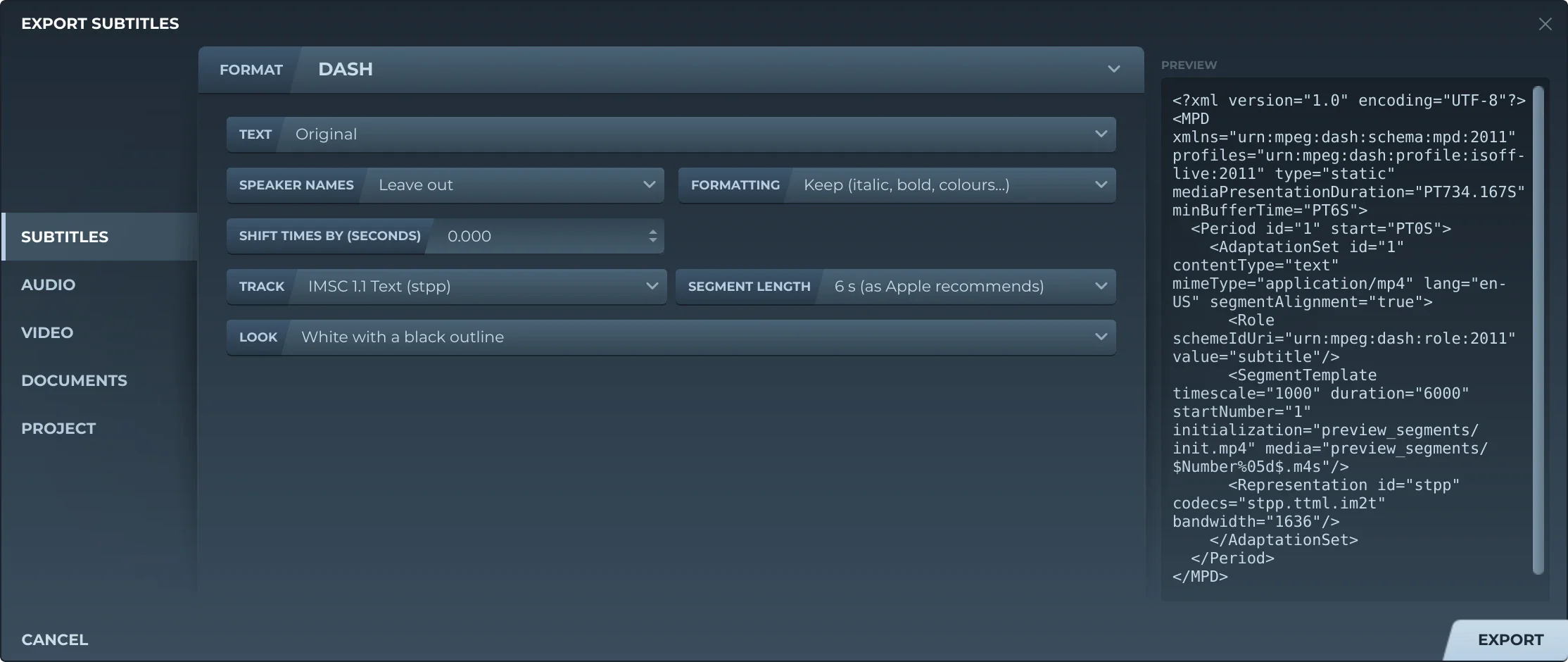
Export, then Subtitles and CMFT or DASH, offers:
- TextThe original, a translation, or both, the translation below.
- Speaker namesLeft out, before the text (Thom: …), or WebVTT's voice tags (
<v Thom>), or TTML's agents (ttm:agent). - FormattingKept, or removed.
- Shift timesEvery subtitle earlier or later by the same amount.
- TrackWebVTT (
wvtt), IMSC 1.1 Text, IMSC 1.0.1 Text, or EBU-TT-D for DVB-DASH: the last three TTML (stpp). - Segment length2, 4, 6 or 10 seconds. 6 is what Apple recommends.
- LookFor a TTML track: white with a black outline, or as Subtitld's preview draws it.
CMFT writes one file: the movie, then a fragment for each segment. DASH writes the manifest and, in a folder beside it named after it (movie.mpd, movie_segments), the movie as init.mp4 and each fragment as 00001.m4s and on; an EBU-TT-D track adds DVB-DASH's profile to the manifest. Either way the clock counts milliseconds, the track is in the language of the text written, and it lasts as long as the video does, or as the subtitles do when there is no video.
Trivia
MPEG-DASH was published as ISO/IEC 23009-1 in April 2012, a few months after MPEG ratified it.
The part of MPEG-4 that puts WebVTT and TTML in MP4 files. Its first edition is from 2014.
CMAF's track files take an extension that says what they hold: .cmfv for video, .cmfa for audio, .cmft for text.
Related formats
Open it in Subtitld with the video and retime it on the waveform.