
Lambda CAP
The subtitle files of Japan's subtitling houses, from Videotron's Lambda system: a line for each screen, its times in frames, its text, and codes after a full-width @ for what Japanese subtitles need. Readings above a word, dots for emphasis, text written down the picture in columns.
At a glance
| Extension | .cap |
|---|---|
| Media type | None registered |
| Specification | None public. Subtitld follows two readers that agree: Subtitle Edit's, and cap2tt of the Timed Text Toolkit. |
| Time precision | A frame, at the video's rate, else 30; at 29.97 in drop-frame timecode where the header says DF1 |
| Text encoding | Shift-JIS in older files; UTF-8 or UTF-16 in newer ones |
| Styling | Ruby, emphasis dots, numbers set across in a column, italics |
| Positioning | Across, at the bottom, top or middle; or down, in columns at the right, left or middle |
| Speakers | None |
| In containers | None. A file delivered with the programme. |
Anatomy of a file
A header, then a line for each screen. Fields are parted by tabs.
Lambda字幕V4  DF1+1  SCENE"和文標準"

1  00002300/00002415  @ルビ上[成都|せいと]@へ行こう  @横下  @中頭
                          二行目
2  00002500/00002714  縦書きの字幕  @縦右  @行頭
3  00002729/00002914  上の字幕  @横上  @中頭  @斜3
- 4 · Header
The format and its version,
DF1for drop-frame timecode (DF0for not), and aSCENEfield, which Subtitld writes as Subtitle Edit does. - 2 · Times
The screen's number, then its start and end as hours, minutes, seconds and frames, eight digits each.
- 3 · Text
Its first line, with codes inside it. Each further line goes on a line of its own, after tabs.
- 1 · Placement
Codes for the whole screen: where it goes, how its lines align, and italics.
The timecode
Written without separators: 00002300. Japanese television runs at 29.97 frames a second; a file whose header says DF1 counts its frames in drop-frame timecode, and one that says DF0 at 30 a second, or the video's rate.
Codes for a screen
| Code | What it does |
|---|---|
@横下 @横上 @横中 |
Written across, at the bottom (the default), the top or the middle |
@縦右 @縦左 @縦中 |
Written down the picture, in columns, at the right, the left or the middle |
@行頭 @行末 |
Lines aligned to their start or their end: left or right across, top or bottom down |
@中頭 @中央 |
Centred |
@斜3 |
Italic, at a slant of 3 (of 0 to 5) |
@正体 |
Upright |
A code with ! after it, @縦右!, holds for the screens after it too, until another takes its place.
Codes in the text
These hold what they are about between [ and ]@:
| Code | What it does |
|---|---|
@ルビ上[成都|せいと]@ |
A reading (ruby) above the base, or before it down a column; @ルビ右 the same down a column |
@ルビ下 @ルビ左 |
A reading below, or to the left of a column |
@ルビ上[誰|・]@ |
Not a reading but emphasis: a dot beside each character |
@組[12]@ |
Set across in one character's room, down a column (tate-chū-yoko) |
@斜3[…]@ |
Italic, for a stretch of text |
In the text, _ stands for a space and _ for an ideographic one. @_@, @_@ and @@@ stand for the characters themselves.
Lambda CAP or IMSC 1.1?
| Lambda CAP | IMSC 1.1 | |
|---|---|---|
| Form | Lines of text, codes after @ | XML |
| Specification | None public | W3C's |
| Times | Frames | Frames, or seconds |
| Ruby, emphasis, vertical text, tate-chū-yoko | Yes | Yes |
| Colours, fonts | No | Yes |
Lambda CAP in Subtitld
- Every screen's text and line breaks
- Ruby, above or below, or either side of a column
- Emphasis dots
- Numbers set across in a column
- Italics, of a screen or a stretch of text
- Text written down, in columns from the right
- Where it sits: one of the nine places
- Start and end, to the frame
- Colours, bold, underline, sizes and typefaces
- Emphasis marks other than a dot
- Columns from the left, which are written from the right
- Speakers, translations beside the original
- Dubs, speakers' faces and colours
Save a .usfx project to keep them.
Opening a Lambda CAP file
A .cap is Lambda's or Cheetah's: Subtitld opens it as Lambda CAP when its text begins with the Lambda字幕 header. It reads:
- Shift-JIS, UTF-8 and UTF-16, with or without a byte order mark;
- frames at the video's rate, else 30, or at 29.97 (59.94) in drop-frame timecode where the header says
DF1; - fields parted by tabs, or by spaces, as older files have them;
- placement and alignment codes as one of nine places, and columns as text written down the picture;
- codes with
!as holding for the screens after them; - ruby, emphasis, tate-chū-yoko and italics as Subtitld's own formatting;
- a numbered screen without times as shown with the one before it.
Typefaces, sizes and codes neither reader knows are left out, their text kept. The frame rate, the timecode and the encoding are kept, to save the file again as it was.
Exporting Lambda CAP
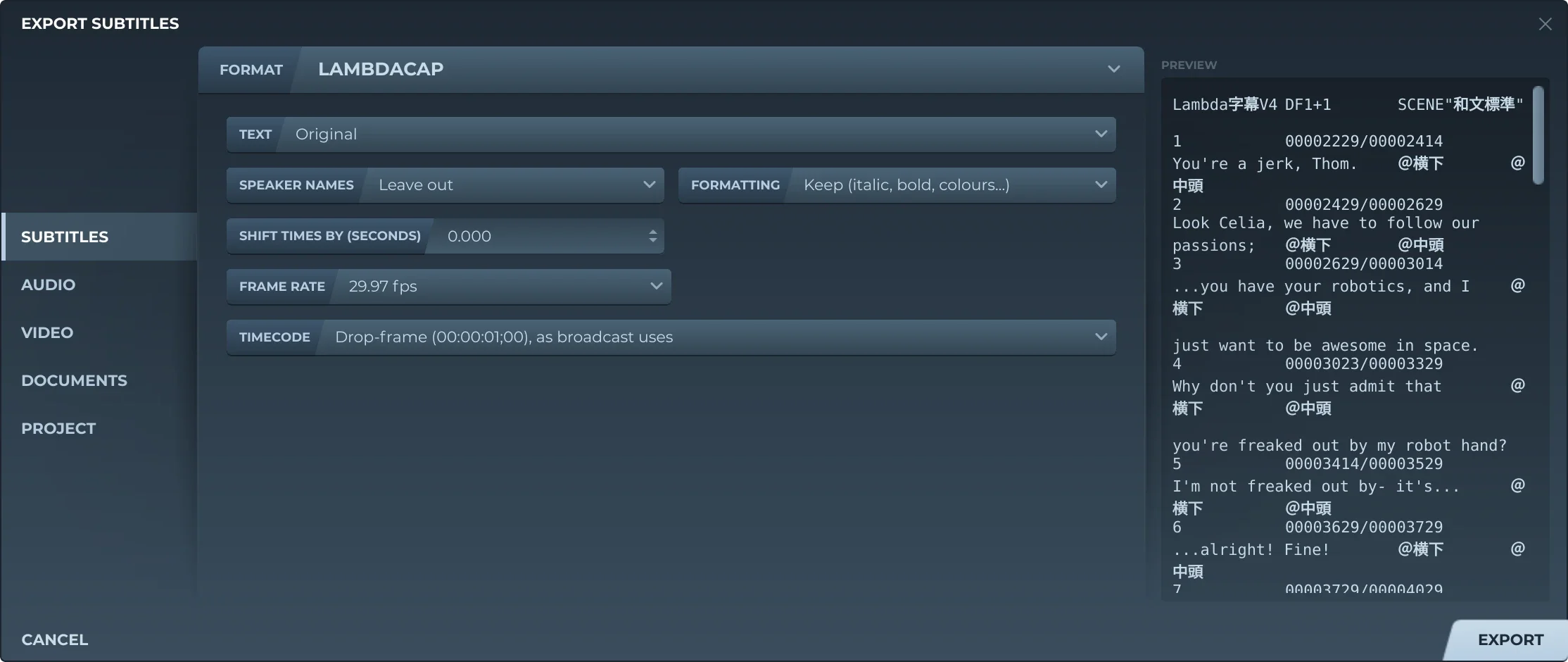
Export, then Subtitles and LAMBDACAP, offers:
- TextThe original, a translation, or both, the translation below.
- Speaker namesLeft out, or before the text (Thom: …).
- FormattingKept, or removed.
- Shift timesEvery subtitle earlier or later by the same amount.
- Frame rateThe video's, unless you choose.
- TimecodeAt 29.97 and 59.94: drop-frame, or not.
Subtitld writes the header, a screen for each subtitle numbered from 1, and its place as codes: @横上, @横中 or @横下 with @行頭, @中頭 or @行末 across; @縦右, @縦中 or @縦左 down. A subtitle italic all through gets @斜3 for the screen. Lines end in CRLF, and the text is UTF-8 with a byte order mark. Saving a file you opened keeps its own encoding; a character Shift-JIS lacks becomes "?".
Trivia
Netflix launched in Japan in September 2015, with Japanese subtitles. It took them in Lambda CAP: the format Japanese subtitling tools supported, and the one existing subtitles were archived in.
Every code starts with a full-width at sign, so that it is never taken for text: @@@ is how a file writes one.
Ruby, the small readings set beside kanji. Lambda CAP writes them as @ルビ codes; IMSC 1.1 and WebVTT carry them too.
Related formats
Open it in Subtitld with the video and retime it on the waveform.