
JSON subtitles and transcripts
Not one format but many: JSON is how speech-to-text engines, video sites and subtitle sites hand over subtitles and transcripts, each in a shape of its own. Subtitld saves its own, in the shape Whisper writes, with everything a subtitle holds, and opens what a dozen other tools write.
At a glance
| Extension | .json |
|---|---|
| Media type | application/json |
| Specification | JSON itself: RFC 8259 and ECMA-404. Each tool's shape is its own. |
| Time precision | Subtitld's: seconds, to the millisecond. Others: milliseconds, seconds, ticks of 100 nanoseconds, or text such as "1.400s". |
| Text encoding | UTF-8 |
| Styling | Subtitld's: the tags its text keeps. YouTube's: bold, italics, underline and colours. The rest: none. |
| Positioning | Subtitld's: in the text, as {\an8}. YouTube's: windows. Bilibili's: a location. |
| Speakers | Subtitld's speaker; speech-to-text services label theirs |
| In containers | None |
Anatomy of Subtitld's JSON
What Subtitld saves, for one subtitle:
{
  "language": "en-us",
  "segments": [
    {
      "id": 0,
      "start": 23.0,
      "end": 24.5,
      "text": "You're a jerk, Thom.",
      "speaker": "Celia"
    }
  ],
  "text": "You're a jerk, Thom."
}| Piece | What it is |
|---|---|
"language" |
The project's language, as Subtitld names it (en-us) |
"segments" |
The subtitles, in order |
"id" |
Its number, from 0, as Whisper numbers them |
"start", "end" |
Seconds |
"text" |
Its text, with its tags (<i>, {\an8}) and line breaks (\n) |
"speaker", "translations" … |
Whatever else the subtitle holds: its speaker, its translations by language, its dubs |
"text", at the end |
All the text on one line, for tools that want only that. Not read back. |
Whisper's shape, on purpose. It is what OpenAI's Whisper writes, so tools that read Whisper's segments read Subtitld's files, and Subtitld opens Whisper's, leaving out the statistics of its decoding and the times of each word.
What Subtitld opens
Each tool's JSON says which it is by its keys. Subtitld opens these:
| Tool | What Subtitld takes from it |
|---|---|
| Subtitld, OpenAI's Whisper | Every field (Subtitld's); the text and language (Whisper's) |
| whisper.cpp | Its segments, and its speakers when it tells the two channels apart |
| WhisperX | Its segments and speakers |
YouTube (.json3, as yt-dlp saves it) |
Text, bold, italics, underline, colours and place |
Bilibili (.bcc) |
Text and place |
| AssemblyAI, Deepgram, AWS Transcribe, Rev.ai, Google Speech-to-Text, Azure Speech, Speechmatics | Words, speakers and language, made into subtitles |
| Amara | Text, italics, bold, underline, and subtitles at the top |
A JSON file that is none of them says so. One that is not valid JSON says where it goes wrong, by line and column.
Transcripts into subtitles
Speech-to-text services hand over words with their times, or long turns of speech. Subtitld makes subtitles of them, as long as its Quality check panel allows: characters a line, lines, and seconds. A subtitle ends:
- where the speaker changes, or speech pauses for more than a second;
- at the end of a sentence, when the next would take it past one line;
- when it is full: at its last punctuation that leaves it fairly full, else between two words.
A turn with no word times is shared out the same way, its time by the length of its parts.
Set the limits first. Subtitles are made as the file opens: change the Quality check limits before opening a transcript to get longer or shorter ones.
Speakers and languages
Services number their speakers: 0, spk_1, SPEAKER_02, S3. Subtitld calls them A, B, C … in the order they first speak, as it names speakers itself; a speaker a file names, as Rev.ai can, keeps the name.
The project's language comes from the file, as a code (en_us, pt) or a name (English, as Whisper keeps it when told so), or else from the file's name: video.en.json3. A file in the project's own language keeps the project's country: pt in a pt-br project stays pt-br.
YouTube's json3
What YouTube's player reads, and yt-dlp saves as .json3: events of text in milliseconds, with pens for bold, italics, underline and colours, and windows for where they sit. Automatic captions roll, a line after another, each shown until the next appears; Subtitld makes each line a subtitle until the next begins.
Bilibili's BCC
What Bilibili's player reads, and the one other JSON Subtitld saves.
{
  "font_size": 0.4,
  "font_color": "#FFFFFF",
  "background_alpha": 0.5,
  "background_color": "#9C27B0",
  "Stroke": "none",
  "body": [
    {
      "from": 23.0,
      "to": 24.5,
      "location": 2,
      "content": "You're a jerk, Thom."
    }
  ]
}
Times are seconds; content is plain text, its lines broken by \n. The look at the top is the one Bilibili's own files carry, and Subtitle Edit writes too.
One subtitle at a time. Subtitles shown at the same moment become one entry, their texts a line each, so the timeline has no overlaps. location is always 2, the bottom centre: Bilibili's player is not known to use it to place subtitles anywhere else.
JSON in Subtitld
- Every subtitle's text, formatting and place
- Speakers, translations and dubs
- Start and end, to the millisecond
- The project's language
- Word times, and how sure a service was of each
- Whisper's statistics of its decoding
- YouTube's fonts, sizes, edges and backgrounds
- In BCC: formatting, place, and translations beside the original
Save a .usfx project to keep what is Subtitld's.
Exporting
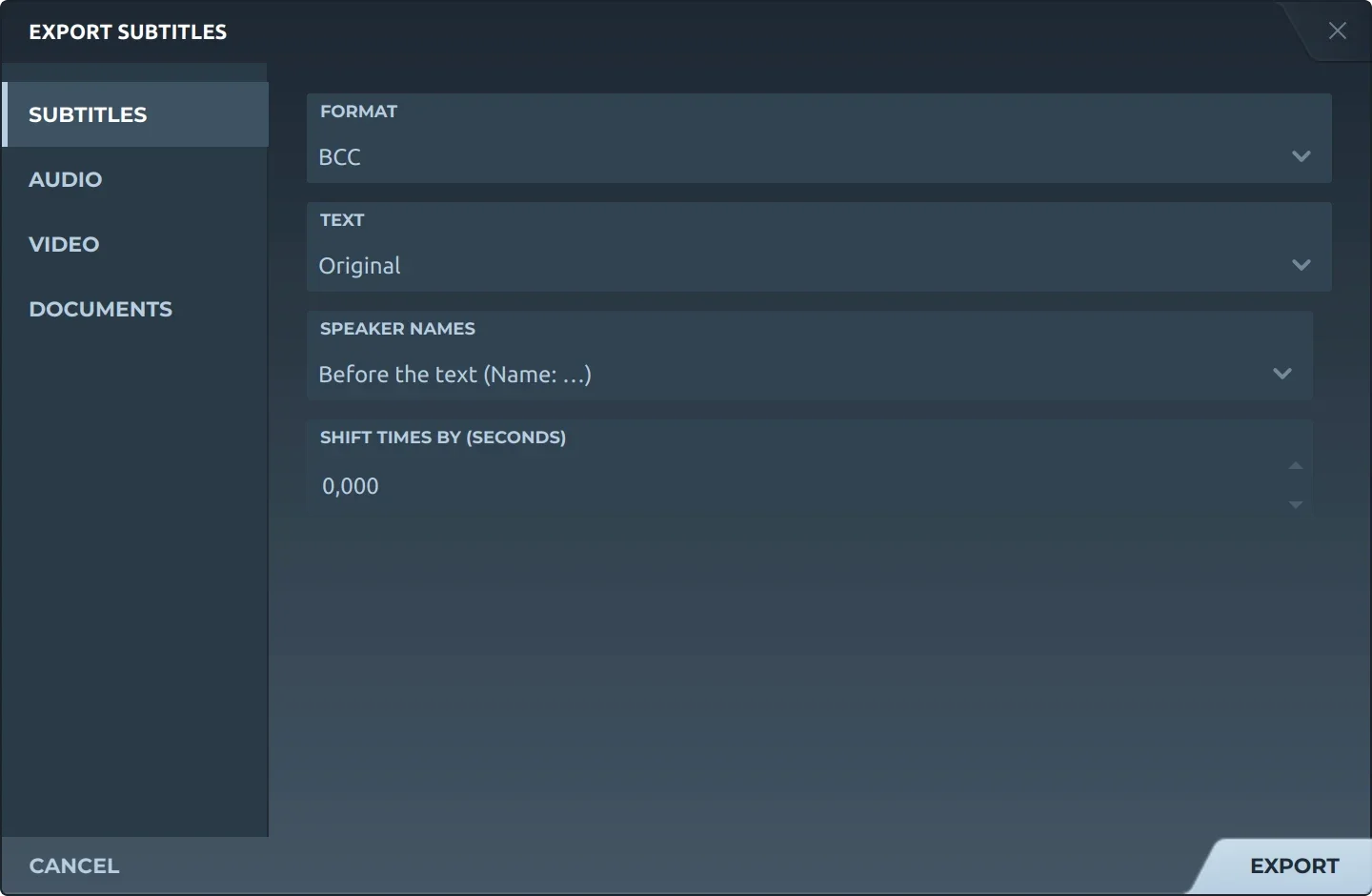
Export, then Subtitles, offers both:
- JSONSubtitld's: the project as it is, every subtitle and every field.
- BCCBilibili's: the original, a translation, or both, the translation below; speaker names left out or before the text; times shifted if you choose.
Trivia
JSON's standard, RFC 8259 of 2017, says JSON sent between systems must be UTF-8.
Ticks a second in Azure's transcripts: it counts time in hundreds of nanoseconds.
Seconds YouTube's player shows a json3 caption that does not say how long it lasts.
Related formats
Open it in Subtitld with the video and retime it on the waveform.