
Advanced SubStation Alpha
The subtitle format that can do almost anything: named styles, any font, colours, outlines, shadows, and codes that place, move and animate each line. Fansubbers have typeset with it for a quarter of a century. Its older sibling, SubStation Alpha (.ssa), reads the same way.
At a glance
| Extension | .ass |
|---|---|
| Media type | None registered; text/x-ssa by habit |
| Specification | Informal. The SubStation Alpha script notes, then what VSFilter and libass draw. |
| Time precision | Hundredths of a second |
| Text encoding | Not declared. UTF-8 today; older files in the encodings of their day, which Subtitld detects. |
| Styling | Named styles, and override codes in the text: fonts, colours, outlines, shadows, rotation, animation |
| Positioning | Anywhere: a style's alignment and margins, {\an8}, {\pos}, {\move} |
| Speakers | An actor (Name) on every line, not shown on screen |
| In containers | Matroska as S_TEXT/ASS or S_TEXT/SSA, its fonts attached; MP4 only converted, without the styling |
Anatomy of a file
Three sections, each a heading in square brackets and lines of Key: value under it.
[Script Info]
PlayResY: 800

[V4+ Styles]
Style: Default,Arial,44,…

[Events]
Dialogue: 0,0:00:30.80,…,Celia,…
- 1 · Script Info
The canvas: the size every position counts in (
PlayResX,PlayResY), how lines wrap (WrapStyle), a title. - 2 · Styles
Named looks: font, size, colours, outline, shadow, alignment and margins. SSA calls the section
[V4 Styles]. - 3 · Events
One line per subtitle:
Dialogue, orComment, which is never shown.
A Dialogue line
Dialogue: 0,0:00:30.80,0:00:34.00,Default,Celia,0,0,0,,{\an8}Why don't you… holds, comma after comma:
| Field | What it is |
|---|---|
| Layer | Higher layers draw on top. SSA has Marked=0 here. |
| Start, End | The times, to the hundredth of a second |
| Style | One of the named styles |
| Name | The actor: who speaks. Not shown. |
| MarginL, MarginR, MarginV | The style's margins for this line; 0 keeps them |
| Effect | Old scrolling effects, mostly empty |
| Text | The rest of the line, commas and all, with its override codes |
The timecode
Hundredths, not thousandths. One digit for the hours and two after the dot. A subtitle timed to the millisecond is rounded to the nearest hundredth when it is saved as ASS.
Override codes
Codes in braces change the line from that point on. These are the common ones, and what Subtitld makes of them.
| Code | Effect | In Subtitld |
|---|---|---|
{\i1}…{\i0} |
Italic | Kept |
{\b1}, {\b700} |
Bold, or a weight | Kept |
{\u1}, {\s1} |
Underline, strikeout | Kept |
{\c&H00D7FF&} |
Text colour | Kept |
{\r}, {\rSign} |
Back to the line's style, or another style's look | Followed |
{\an8} |
Place the line: the keypad's nine places | Kept |
\N, \n, \h |
A line break; a break only under WrapStyle: 2; a no-break space |
Kept as lines and spaces |
{\pos(960,100)}, {\move(…)} |
An exact point, or a path | Not kept |
{\fad(200,200)}, {\t(…)} |
Fades and animation | Not kept |
{\k20} |
Karaoke timing | Not kept; the text stays |
{\fnArial\fs48} |
Font and size | Not kept |
{\p1}…{\p0} |
A vector drawing | Not a subtitle |
Colours run backwards. &H00D7FF& is gold: blue, green, red, in that order. A style's colour adds the alpha in front, where 00 is solid and FF invisible.
SSA or ASS?
| SubStation Alpha .ssa | Advanced SubStation Alpha .ass | |
|---|---|---|
| Version | v4.00 | v4.00+ |
| Styles section | [V4 Styles] |
[V4+ Styles] |
| Alignment | Its own numbers: 1 2 3 bottom, 5 6 7 top, 9 10 11 middle | The keypad's, 1 to 9 |
| Underline, strikeout | — | In styles and codes |
| Layers | — | One per line |
| Used by | Older tools | Aegisub, players, fansubbing |
ASS in Subtitld
- Every subtitle's text and line breaks
- Italic, bold, underline, strikeout and colour, from styles and codes
- Where it sits on the screen
- Speakers, as actors
- Start and end, to the hundredth, in order
- Exact positions, fades, animation and karaoke
- Fonts, sizes and outlines line by line; layers
- Drawings and comments
- Translations beside the original, dubs, speakers' faces
Save a .usfx project to keep what is Subtitld's.
Opening an ASS or SSA file
Subtitld reads both versions and:
- gives each line its style's look (italic, bold, underline, strikeout, a colour other than white) and place, then follows the codes in its text;
- takes the actor as the line's speaker, ready for dubbing;
- skips
Commentlines and drawings, keeping any text after a drawing; - reads
\nas the file'sWrapStylesays: a line break under style 2, a space otherwise; - decodes any encoding, and puts the lines in order.
What Subtitld has no place for, such as exact positions, fades, karaoke and fonts, is left out. The text itself stays.
Exporting ASS
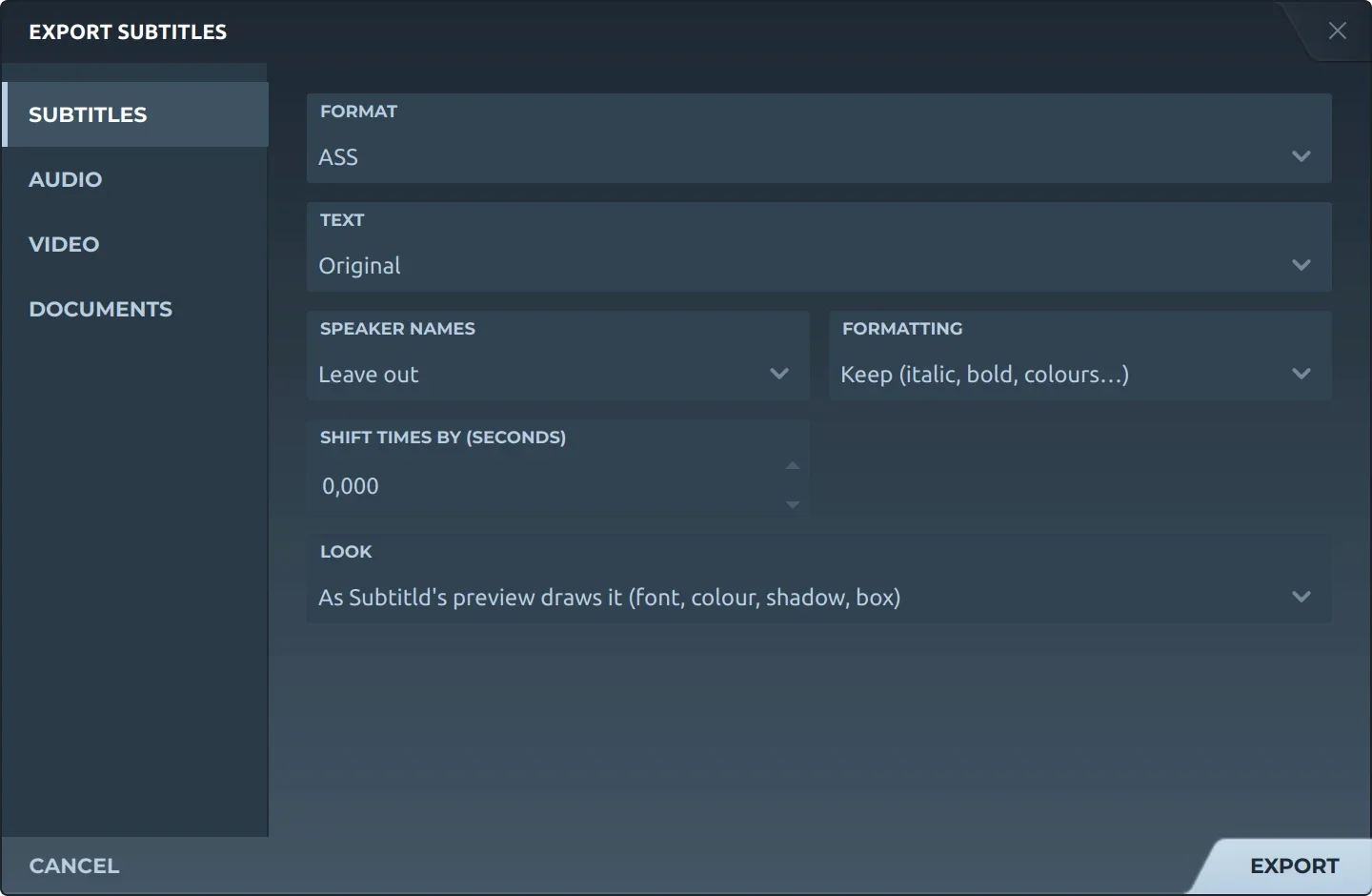
Export, then Subtitles and ASS, offers:
- TextThe original, a translation, or both, the translation below.
- Speaker namesLeft out of the text, or before it (Thom: …). Either way they go in as actors.
- FormattingKept, or removed.
- Shift timesEvery subtitle earlier or later by the same amount.
- LookWhite with a black outline, or as Subtitld's preview draws it: its font, colour, shadow and translucent box.

The script is sized to the video, PlayResX and PlayResY its width and height, and its one style, Default, is scaled to that height: 60 pixels at 1080. Name the file .ssa and it is written as SubStation Alpha v4, its positions in SSA's numbers.
Trivia
SubStation Alpha was an editor, written by Kotus. Its script format took the program's name and outlived it.
Advanced SubStation Alpha marks itself with the original's version and a plus: the same sections, more codes.
Colours are written blue, green, red, and alpha counts down: 00 is solid, FF invisible.
Related formats
Open it in Subtitld with the video and retime it on the waveform.