
Digital Cinema Package subtitles, Interop and SMPTE
The subtitles a cinema projects: XML the server draws over the picture, each line placed on its own, or pictures in PNG. There are two generations, and cinemas play both: Interop, from Texas Instruments' CineCanvas, and SMPTE ST 428-7, the standard that followed.
At a glance
| Extension | .xml |
|---|---|
| Media type | None registered |
| Specification | Interop: Texas Instruments' CineCanvas, never formally standardised. SMPTE: ST 428-7 (2007, 2010, 2014), wrapped in MXF by ST 429-5. |
| Time precision | Interop: ticks of 4 milliseconds. SMPTE: a frame of the reel. |
| Text encoding | UTF-8, as the XML declares |
| Styling | Font, size, colour, italic, bold, underline, a border or a shadow, fades. SMPTE adds ruby. |
| Positioning | Each line on its own: top, centre or bottom, left, centre or right, and a distance in % of the picture |
| Speakers | None |
| In containers | Interop: the XML in the package beside the film, its fonts and PNGs beside it. SMPTE: an MXF track file with its fonts and PNGs. |
Anatomy of a file
A reel's subtitles: a head about the film, a font around them all, and a <Subtitle> for each. What Subtitld writes in SMPTE, for two subtitles:
<SubtitleReel xmlns="…/428-7/2010/DCST">
  <Id>urn:uuid:8a3c1e2b-…</Id>
  <ContentTitleText>Tears of Steel</ContentTitleText>
  <Language>en</Language>
  <EditRate>24 1</EditRate> <TimeCodeRate>24</TimeCodeRate>
  <SubtitleList>
<Font Color="FFFFFFFF" Effect="border" Size="42" …>
<Subtitle SpotNumber="1" TimeIn="00:00:23:00" TimeOut="00:00:24:12" …>
  <Text Valign="bottom" Vposition="10" Halign="center">You're a jerk, Thom.</Text>
</Subtitle>
<Subtitle SpotNumber="2" TimeIn="00:00:25:03" TimeOut="00:00:28:00" …>
  <Text Valign="top" Vposition="10" Halign="center"><Font Italic="yes">Celia,</Font> wait.</Text>
  <Text Valign="top" Vposition="16.4" Halign="center">I can explain.</Text>
</Subtitle>
</Font>
- 1 · Head
The reel's UUID, the film's title, its language, and the frame rate its times count in.
- 2 · Font
What every subtitle looks like unless it says otherwise: white letters with a black border, 42 points.
- 3 · Timing
In and out: hours, minutes, seconds and frames. Fades in and out, here none.
- 4 · Text
A line each, placed on its own: its edge, and how far from it in % of the picture's height. Fonts inside style a few words.
The timecode
A SMPTE reel counts in frames of its TimeCodeRate, and may count from a StartTime other than zero. Interop counts in ticks, 250 to the second, whatever the film's rate: 00:00:25:030 is 25.12 seconds.
Interop or SMPTE?
| Interop | SMPTE | |
|---|---|---|
| Root | <DCSubtitle>, no namespace |
<SubtitleReel>, in SMPTE's namespace |
| Identity | <SubtitleID>, <MovieTitle> |
<Id> (urn:uuid), <ContentTitleText>, <IssueDate> |
| Times | Ticks of 4 ms: 00:00:25:030 |
Frames: 00:00:25:03 |
| Spelling | VAlign, HPosition, Underlined |
Valign, Hposition, Underline |
| A picture | <Image> names a PNG beside the XML |
<Image> names a PNG by urn:uuid, inside the MXF |
| In the package | The XML as it is | Wrapped in an MXF track file, which can be encrypted |
Projectors read both spellings. Subtitld does too: HAlign in a SMPTE file is read as Halign.
Text or pictures
A subtitle is text, which the server draws in the font the package carries, or an <Image>: a PNG drawn beforehand, placed on the picture like a line of text. Pictures look the same on every server, and carry scripts and styles a server's font cannot.
DCP in Subtitld
- Every subtitle's text and line breaks
- Italic, bold, underline, colour, raised and lowered text, sizes
- A subtitle's own size, border or shadow
- Ruby, and characters set upright in a column
- Text written down the picture, or right to left
- Where it sits: the nine places, and its margins
- Start and end, to the tick or the frame
- The font a file names: it is a file in the package, not one Subtitld has
- Fades in and out
- Speakers, translations beside the original
- Dubs, speakers' faces and colours
Save a .usfx project to keep them.
Opening a DCP subtitle file
An .xml is many formats: Subtitld tells DCP subtitles by their root, <DCSubtitle> or <SubtitleReel>, and reads:
- Interop's times in ticks, or in milliseconds where an older file counts past the 249th tick; SMPTE's in frames of its rate, from its
StartTime; - a subtitle's lines top to bottom, and where it sits from its outermost line;
- the formatting of the fonts around each run, and a subtitle's own size and border or shadow as its look;
- the 2007, 2010 and 2014 namespaces of SMPTE;
- the language as the project's, and the film's title.
The generation, and a SMPTE reel's frame rate, are kept to save it again as it was. Subtitld opens the XML, not an MXF track file: take the XML out of the package first.
A DCP of pictures
A file whose subtitles are <Image>s holds no words to edit. Subtitld finds each PNG beside the file (a SMPTE one as <uuid>.png) and asks an OCR add-on, Tesseract or PP-OCRv5, to read it. The text comes in where each picture was, and saves as DCP subtitles in text.
Exporting DCP subtitles
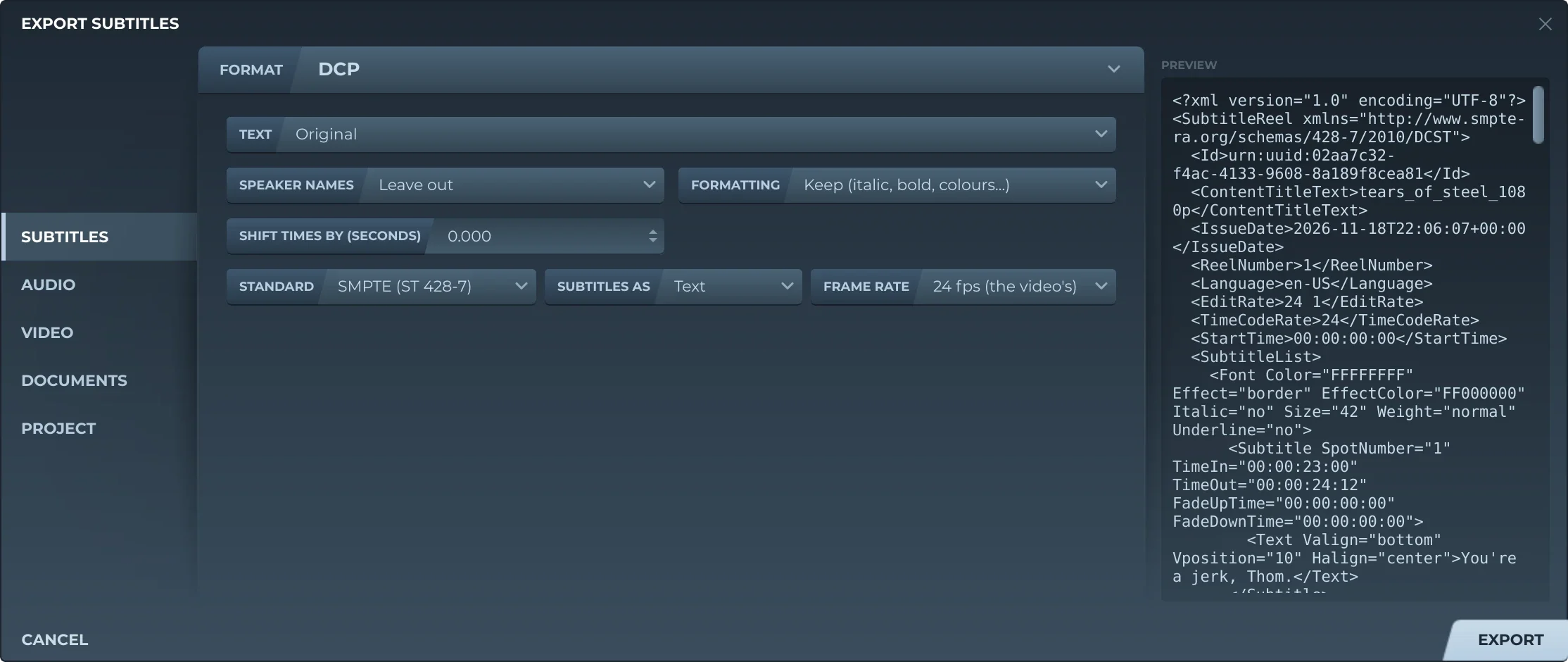
Export, then Subtitles and DCP, offers:
- TextThe original, a translation, or both, the translation below.
- Speaker namesLeft out, or before the text (Thom: …).
- FormattingKept, or removed.
- Shift timesEvery subtitle earlier or later by the same amount.
- StandardSMPTE (ST 428-7), or Interop (CineCanvas).
- Subtitles asText, or pictures.
- Frame rateSMPTE only: 24, 25, 30, 48, 50 or 60, the nearest to the video's unless you choose.
In text, every subtitle sits inside one font: white with a black border, 42 points. Each line is a <Text>, stacked from the subtitle's place, the title-safe margins unless it has its own. Times count from 00:00:00:00, with no fades. The file is in the language of the text written, and titled with the project's title, else the video's name. No font file is written: the server draws the text in its own font, or the one a mastering tool adds.
As pictures, each subtitle is drawn as Subtitld's preview draws it, on a frame the video's size (else 1920 by 1080), a PNG beside the XML: named after the file for Interop, by a new UUID for SMPTE.
SMPTE wants an MXF. ST 429-5 has a SMPTE reel wrapped, with its PNGs, in an MXF track file. Subtitld writes the XML and the loose PNGs, and wraps nothing: a projector will not play them as they are. Give them to a mastering tool, such as DCP-o-matic, to build the package. Interop's XML and PNGs go into a package as they are.
Trivia
Ticks in a second of Interop time: each is 4 milliseconds, whatever the film's frame rate.
The Texas Instruments format Interop's subtitles grew from. Interop itself was never formally standardised.
SMPTE's subtitles can carry ruby, the small readings set beside Japanese text, and 3D text. CineCanvas has neither.
Related formats
Open it in Subtitld with the video and retime it on the waveform.