
WebVTT
The subtitle format of the web: what a browser shows through HTML's <track>. SubRip's blocks, with a header, a period before the milliseconds, and a place for styling, positions and speakers.
At a glance
| Extension | .vtt |
|---|---|
| Media type | text/vtt |
| Specification | W3C, WebVTT: The Web Video Text Tracks Format, a Candidate Recommendation |
| Time precision | Milliseconds |
| Text encoding | UTF-8, always: the specification requires it. Subtitld reads other encodings anyway. |
| Styling | Italic, bold and underline tags; colours through classes and CSS (::cue). No strikeout. |
| Positioning | Cue settings (line, position, align, size, vertical) and regions |
| Speakers | Voice tags: <v Thom> |
| In containers | Matroska as S_TEXT/WEBVTT; MP4 as wvtt (ISO/IEC 14496-30); HLS and DASH streams |
Anatomy of a cue
A file is a header, then cues. Each cue is a block like SubRip's, with two optional parts.
WEBVTT

intro
00:00:23.000 --> 00:00:24.500 line:0
<v Celia>You're a jerk,
<i>Thom</i>.
- 1 · Header
WEBVTT, alone or followed by a space and a title, then a blank line. Without it, a browser refuses the whole file. - 2 · Identifier
Optional. A name for the cue, on its own line: a number, as in SubRip, or a word.
- 3 · Timing
Start, the arrow
-->, end. A period before the milliseconds. - 4 · Settings
Optional. Where to show the cue, after the end time.
- 5 · Text
Lines of text, with tags for styling and voices. A blank line ends the cue, so there is null inside one.
The timecode
The hours may be left out. 00:27.000 is the same time, and many files under an hour are written that way. A comma before the milliseconds is SubRip's habit, not WebVTT's; Subtitld reads it anyway.
Blocks besides cues
| Block | What it holds |
|---|---|
NOTE |
A comment, for people. Players skip it. |
STYLE |
CSS for the cues, through ::cue. Before the first cue. |
REGION |
A named area of the screen that cues can scroll in. |
Cue text
| Tag | Effect |
|---|---|
<i>…</i>, <b>…</b>, <u>…</u> |
Italic, bold, underline |
<c.yellow>…</c> |
A class, which CSS (or WebVTT's own colour classes) can colour |
<v Thom>… |
The voice: who is speaking. Closing it is optional. |
<lang pt>…</lang> |
The language of a stretch of text |
<ruby>漢<rt>kan</rt></ruby> |
A reading above the text, for Japanese and Chinese |
<00:00:28.500> |
A timestamp inside the cue, for karaoke |
& < > |
An ampersand, <, > and a no-break space, which would otherwise read as markup |
Colours
Eight classes are coloured with no CSS at all: white, lime, cyan, red, yellow, magenta, blue and black, and the same eight with bg_ for the background. Any other colour needs a class of your own and a STYLE block:
STYLE
::cue(.gold) { color: #ffd700; }

00:00:30.800 --> 00:00:34.000
<c.gold>Why don't you just admit that</c>
Not every player reads STYLE blocks; WebVTT's own colour classes are the safer choice. Subtitld uses them whenever a colour is one of the eight.
Cue settings
| Setting | What it does |
|---|---|
line:0 |
The line on the screen: a number counts lines from the top (negative from the bottom), a percentage from the top edge |
position:10% |
Where the cue's box sits across the screen |
align:start |
Text alignment in the box: start, center, end, left, right |
size:50% |
The box's width |
vertical:rl |
Vertical text, right to left or left to right |
region:fred |
Show the cue in a REGION |
Subtitld reads line, position and align as the subtitle's place on the screen, the same nine places as SubRip's {\an1} to {\an9}, and writes them back: line:0 for the top, line:50%,center for the middle, position:10% align:start and position:90% align:end for the sides.
WebVTT in Subtitld
- Every subtitle's text and line breaks
- Italic, bold, underline and colour
- Where it sits on the screen
- Speakers, as voice tags
- Start and end, to the millisecond, in order
- Strikeout: WebVTT has no tag for it
- Speakers' faces and colours
- Translations beside the original (one can take its place, or go below it)
- Dubs and metadata
Save a .usfx project to keep them.
Opening a WebVTT file
Subtitld finds each cue by its timing line and reads:
- the header,
NOTE,STYLEandREGIONblocks as what they are, not as subtitles, and cue identifiers as names; - times with or without hours, with a period or a comma;
- voices as the subtitles' speakers, ready for dubbing;
- WebVTT's colour classes, and the colours a
STYLEblock gives other classes; line,positionandalignas the place on the screen;- any encoding, though WebVTT asks for UTF-8.
It leaves out what it has no place for: regions, a cue's size, vertical text, ruby's readings and karaoke timestamps. The text itself stays.
Exporting WebVTT
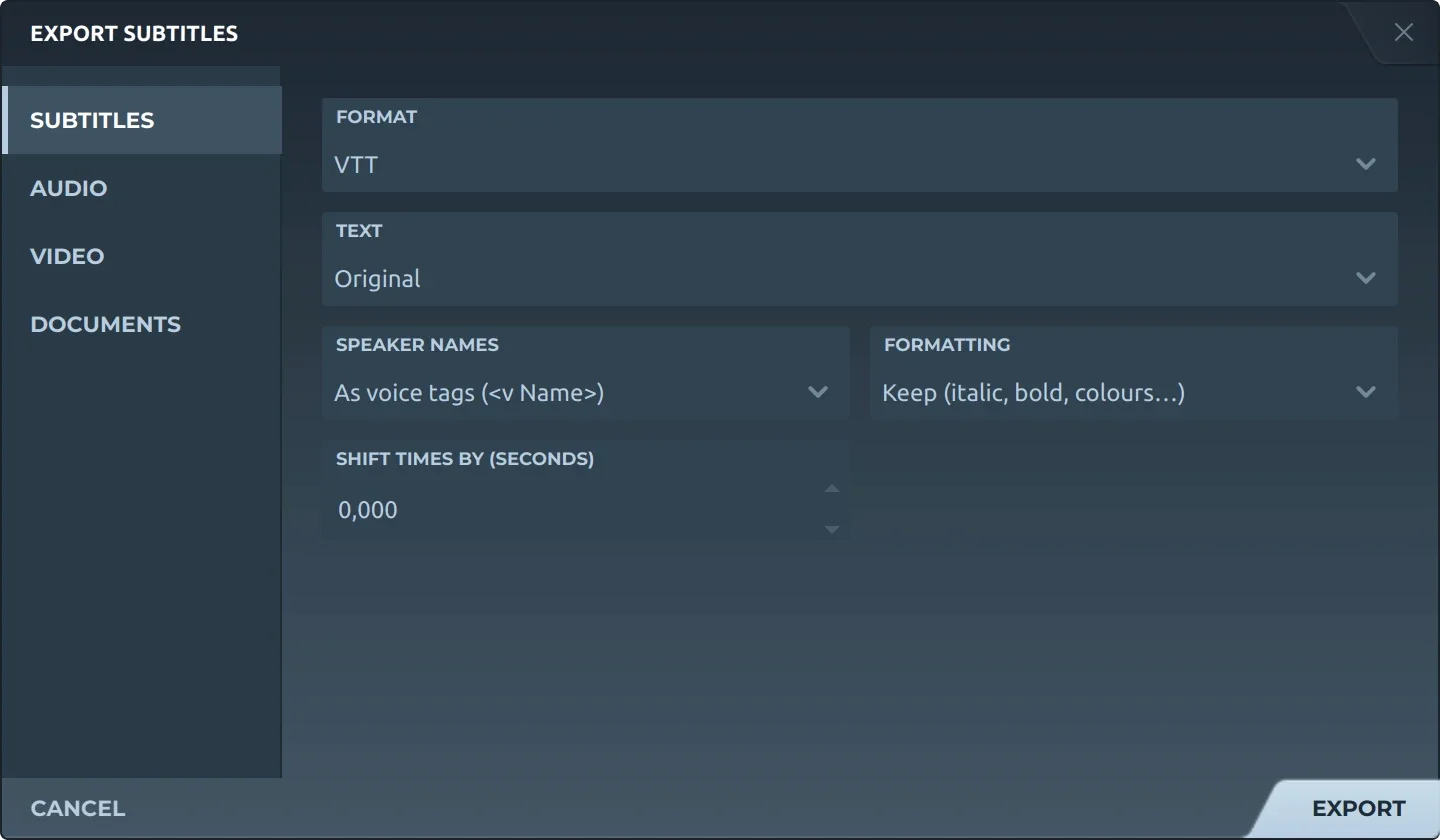
Export, then Subtitles and VTT, offers:
- TextThe original, a translation, or both, the translation below.
- Speaker namesLeft out, before the text (Thom: …), or as voice tags (
<v Thom>), WebVTT's own way. - FormattingKept, or removed.
- Shift timesEvery subtitle earlier or later by the same amount.
The file is always UTF-8, as WebVTT requires: WEBVTT, then the cues in order of start, every time with its hours. Characters that would read as markup are written as entities, and empty subtitles are left out.
On a web page
<video controls src="tears-of-steel.mp4">
  <track kind="subtitles" src="tears-of-steel.en.vtt"
         srclang="en" label="English" default>
</video>
Serve the file as text/vtt. From another domain, the video needs crossorigin and the server an Access-Control-Allow-Origin header, or the browser will not load the track.
WebVTT or SubRip?
SubRip for players, editors and uploads; WebVTT for video on the web. The SubRip page sets them side by side.
Trivia
It began as WebSRT, drafted at the WHATWG for HTML5's new <track> element and built on SubRip, before it took the name WebVTT.
Six letters at the very start of every file. A browser that does not find them refuses the whole track.
Colours a player knows with no CSS: white, lime, cyan, red, yellow, magenta, blue and black, for text and for its background.
Related formats
Open it in Subtitld with the video and retime it on the waveform.