
BDN XML with PNG pictures
What Blu-ray subtitles are authored from: a PNG for each subtitle, and an XML file that says when each one shows and where. Authoring software turns them into the disc's PGS stream. Subtitld opens one with an OCR add-on, which reads the words in the pictures, and draws your subtitles as PNGs to save one.
At a glance
| Extension | .xml |
|---|---|
| Media type | None registered. The XML is application/xml, the pictures image/png. |
| Specification | None published. Sony's, as Scenarist, the authoring software, uses it; the file names its schema, version 0.93. |
| Time precision | A frame, at one of Blu-ray's rates: 23.976, 24, 25, 29.97, 50 or 59.94 |
| Text encoding | None: the words are pixels. The XML is UTF-8. |
| Styling | Whatever was drawn, in the PNG's colours |
| Positioning | Anywhere on the frame, in pixels from its top left |
| Speakers | None |
| In containers | None. A folder: the XML and its PNGs. |
Anatomy of a file
The XML, as Subtitld writes it, with a PNG beside it for each subtitle:
<BDN Version="0.93" …>
  <Description>
    <Name Title="Tears of Steel" Content=""/>
    <Language Code="eng"/>
    <Format VideoFormat="1080p" FrameRate="23.976" DropFrame="False"/>
    <Events Type="Graphic" FirstEventInTC="00:00:22:23"
            LastEventOutTC="00:00:27:23" NumberofEvents="2"/>
  </Description>
  <Events>
    <Event InTC="00:00:22:23" OutTC="00:00:24:11" Forced="False">
      <Graphic Width="400" Height="60" X="760" Y="960">film_00001.png</Graphic>
    </Event>
    …
- 1 · Root
<BDN>and the version of the format, which tells it apart from the other XML files a subtitle can be. - 2 · Description
The title, the language in ISO 639-2's three letters, the frame's size by name, the frame rate, and a summary of the events.
- 3 · Event
What is on screen from one timecode to another, and whether it shows with subtitles turned off (
Forced). - 4 · Graphic
A picture: its size, where its top left corner goes, and its file, beside the XML.
The timecode
At 23.976, 29.97 and 59.94 the frames are counted as if the rate were 24, 30 or 60: a label for each frame, the labels falling 0.1 % behind the clock. 00:00:22:23 at 23.976 is frame 551, 22.98 seconds in, the frame nearest 23 seconds. BDSup2Sub and Subtitle Edit count them the same way.
| VideoFormat | Frame |
|---|---|
480i, 480p |
720×480 |
576i, 576p |
720×576 |
720p |
1280×720 |
1080i, 1080p |
1920×1080 |
1440x1080 and others |
As written, width × height |
BDN or PGS?
| BDN XML | PGS | |
|---|---|---|
| For | Authoring a disc | Playing one |
| Files | An XML and a PNG for each picture | One .sup |
| Colours | The PNG's | Up to 256 a picture |
| Times | Frames, as timecode | Ticks of a 90 kHz clock |
| Language | In the XML | Not in the file |
| Overlaps | An event can hold two pictures | A composition can show two objects |
BDN in Subtitld
- Every subtitle, as the preview draws it: its text, line breaks, formatting, colours and place, in true colour
- Forced subtitles
- The language, and the title
- Start and end, to the frame
- The text itself: reading it back from the PNGs takes OCR
- Translations beside the original
- Dubs, speakers' names and faces
Save a .usfx project to keep what is Subtitld's.
Opening a BDN file
The words are pixels, so an OCR add-on reads them: Tesseract OCR or PP-OCRv5, from the Add-ons panel. Without one, Subtitld says which to install.
Open the XML, its PNGs beside it. Many formats are .xml; Subtitld knows a BDN by its <BDN> root. It asks which language the subtitles are in, the one the file names already chosen, and Read starts the reading. It reads:
- the frame's size from VideoFormat, by name or as width × height, else 1920×1080;
- times at the file's frame rate, drop-frame where the file says so at 29.97 and 59.94, as Subtitle Edit reads them;
- each picture of an event where it is placed, and forced where its event is;
- a picture in the top part of the frame as a subtitle placed at the top.
The file's frame rate and title are kept, to export it as BDN again. The subtitles are saved as SRT unless you choose otherwise: saving BDN over the file would draw new PNGs over the ones it came with.
Exporting BDN
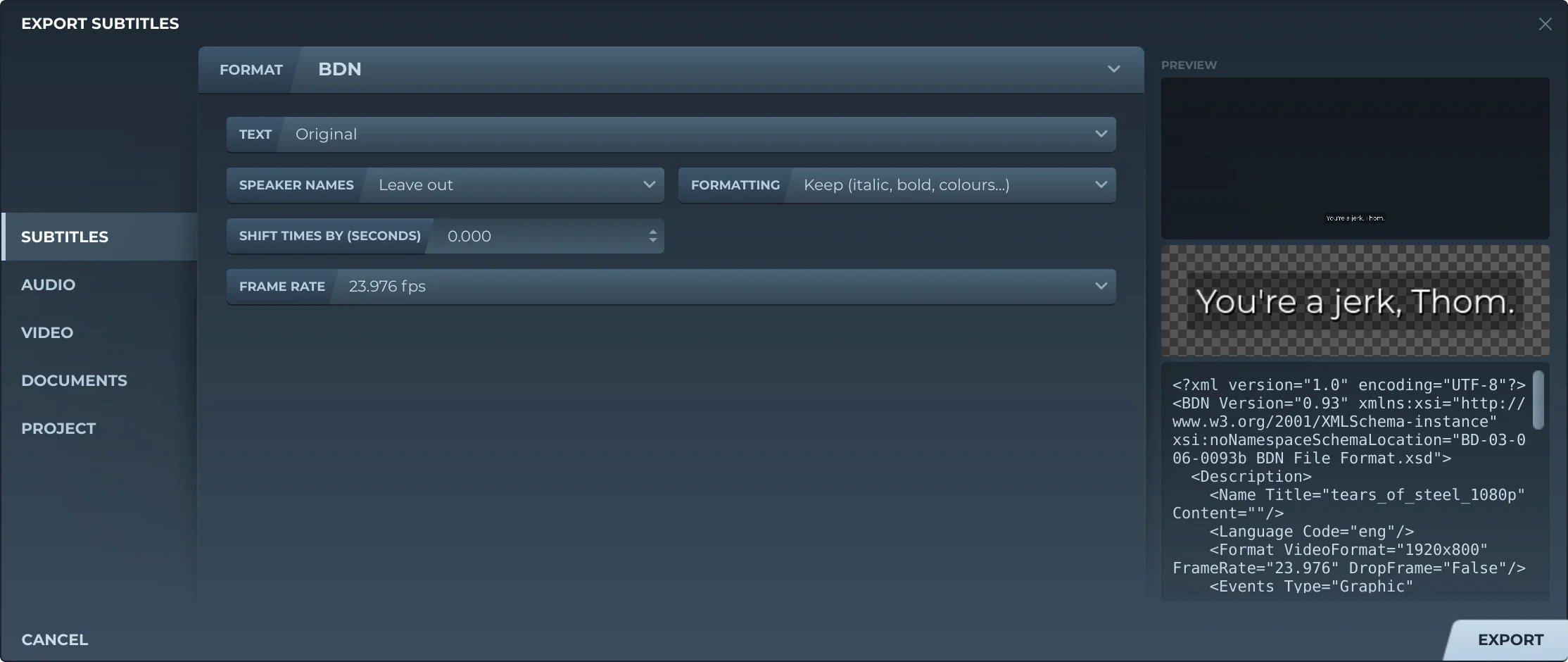
Export, then Subtitles and BDN, offers:
- TextThe original, a translation, or both, the translation below.
- Speaker namesLeft out, or before the text (Thom: …).
- FormattingKept, or removed.
- Shift timesEvery subtitle earlier or later by the same amount.
- Frame rate23.976, 24, 25, 29.97, 50 or 59.94: the one nearest the video's, unless you choose.
Each subtitle is drawn as the preview draws it, on a frame the video's size, else 1920×1080, and saved as a PNG beside the XML, named after it: film.xml has film_00001.png, film_00002.png … An export again removes the PNGs of the one before by those names, and nothing else in the folder.
Events may not overlap. Where subtitles do, the time is cut where what is on screen changes, and each piece is an event holding every picture shown then, the same PNG named again. Such an event is forced only when all it shows is. Timecodes are never drop-frame, as BDSup2Sub writes them, and the frame's size is named as BDSup2Sub names it: 480i, 576i, 720p, 1080p, else width × height.
Trivia
The version every BDN file Subtitld writes declares, after the schema it names: BD-03-006-0093b.
BDSup2Sub calls the format Sony BDN XML, as used by Sonic Scenarist HDMV, the software Blu-ray discs are authored with.
The frame 00:00:22:23 is at 23.976 frames a second: counted as 24, each label a frame, 22.98 seconds in.
Related formats
-
.supPresentation Graphic Stream
-
.idxVobSub, DVD subtitles
-
.xmlDigital Cinema Package subtitles, Interop and SMPTE
Open it in Subtitld with the video and retime it on the waveform.