
GPAC Timed Text XML
An MP4 text track written out as XML. MP4Box, GPAC's tool, writes it when it takes a 3GPP timed text track out of a file, and reads it to put one in: the subtitles players know as tx3g, or FFmpeg as mov_text.
At a glance
| Extension | .ttxt |
|---|---|
| Media type | None registered |
| Specification | The file: GPAC's TTXT documentation. The track: 3GPP TS 26.245 (2004), and MPEG-4 Part 17. |
| Time precision | Milliseconds |
| Text encoding | UTF-8, as the XML declares |
| Styling | Bold, italic, underline, colour, size and font; blinking, karaoke, highlights and links |
| Positioning | A text box on the picture, and the text justified in it: left, centre or right, top, centre or bottom |
| Speakers | None |
| In containers | The track, not the file: a tx3g text track in MP4, 3GP and QuickTime |
Anatomy of a file
A header that says how text is drawn, then a sample for each change on screen. What Subtitld writes, cut short:
<TextStream version="1.1">
<TextStreamHeader width="1920" height="1080" …>
<TextSampleDescription horizontalJustification="center"
    verticalJustification="bottom" …>
  <FontTable><FontTableEntry fontName="Sans-Serif" fontID="1"/></FontTable>
  <Style styles="Normal" fontID="1" fontSize="54" color="ff ff ff ff"/>
</TextSampleDescription>
</TextStreamHeader>
<TextSample sampleTime="00:00:23.000" sampleDescriptionIndex="1"
    xml:space="preserve">You're a jerk, Thom.</TextSample>
<TextSample sampleTime="00:00:24.500" text=""/>
<TextSample sampleTime="00:00:25.120" sampleDescriptionIndex="2" …>Celia, wait.
I can explain.<Style fromChar="0" toChar="6" styles="Italic" …/>
</TextSample>
- 1 · Stream
The version of the file.
- 2 · Header
The track's size, and a description for each way of drawing text: where it is justified, the fonts, the style it starts with.
- 3 · Samples
Each sample's time, and the description it uses. An empty sample clears the screen.
- 4 · Text
The text, then what styles parts of it, counted in characters from 0.
Samples, not subtitles
A tx3g track shows one sample at a time: each from its time until the next sample's. A subtitle has no end of its own, so an empty sample ends it. Two subtitles cannot show at once.
What follows the text
| Element | What it does | In Subtitld |
|---|---|---|
<Style> |
Bold, italic, underlined, a colour (r g b a in hex), a size and a font, for a stretch |
Kept, but for the font |
<Blinking> |
Text that blinks | Kept, as flashing text |
<Karaoke> |
Stretches lit one after another, each until its endTime |
Kept, as karaoke timing |
<Highlight>, <HyperLink> |
A stretch highlighted, or a link | Not kept |
<TextBox> |
A box for this sample only | Not kept |
Characters, counted in UTF-16. fromChar and toChar count the text in UTF-16 units, as the track stores it: a character beyond the first 65,536, such as an emoji, counts as two.
One extension, two formats
CCExtractor, which takes captions out of TV recordings, also names its timed transcripts .ttxt: plain text, a line a caption, its columns parted by |.
| Format | What is in it | In Subtitld |
|---|---|---|
| GPAC TTXT | XML, a <TextStream> |
Opened as TTXT |
| CCExtractor's timed transcript | Plain text: times, then other columns and the words, parted by bars | Not opened: Subtitld says it is CCExtractor's transcript |
Subtitld looks at the file's first bytes to tell them apart. Ask CCExtractor for SubRip (-srt) to open its captions in Subtitld.
TTXT in Subtitld
- Every subtitle's text and line breaks
- Italic, bold, underline, strikethrough, colour and size
- Flashing text and karaoke timing
- Where it sits: top, middle or bottom; left, centre or right
- Text written down the picture
- Start and end, to the millisecond
- Subtitles that overlap: one ends where the next begins
- Fonts, ruby, and places beyond the nine
- Speakers, translations beside the original
- Dubs, speakers' faces and colours
Save a .usfx project to keep them.
Opening a TTXT file
Subtitld reads:
- a subtitle for each sample with text, until the next sample; the last, with none after it, for three seconds;
- the text inside the sample, or the
textattribute of version 1.0 files, its lines in single quotes; - bold, italic, underline, strikethrough, a colour other than the description's and a size against its size, as formatting; blinking as flashing text; karaoke as karaoke timing;
- the description's justification as one of nine places (left and bottom where it says none, as MP4Box has it), and
verticalTextas text written down the picture.
A file that is not GPAC's TTXT says so.
Exporting TTXT
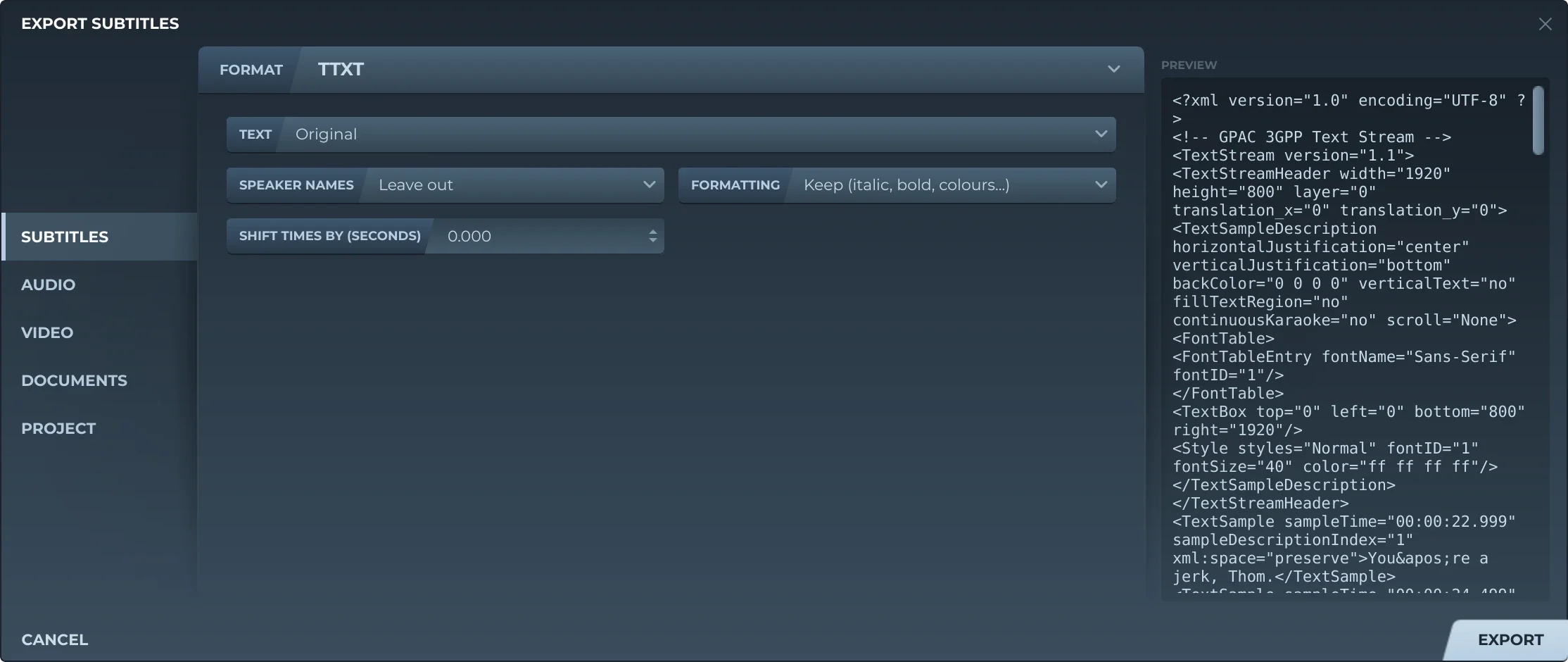
Export, then Subtitles and TTXT, offers:
- TextThe original, a translation, or both, the translation below.
- Speaker namesLeft out, or before the text (Thom: …).
- FormattingKept, or removed.
- Shift timesEvery subtitle earlier or later by the same amount.
The track is the video's size (GPAC's 400 by 80 without one), its letters a twentieth of its height. Each place a subtitle sits in gets a description of its own; each subtitle is a sample, with an empty one wherever it ends before the next begins. The text is UTF-8, without the readings of a ruby.
MP4Box -add subtitles.ttxt video.mp4 puts the subtitles into the video as a text track.
Trivia
3GPP approved its timed text format, TS 26.245, for streaming video to mobile phones. MPEG made it MPEG-4 Part 17 in 2006, with almost nothing changed.
The name of the text track in an MP4 file: four letters, as every kind of track has. MP4Box and QuickTime Pro both make one.
FFmpeg's name for the same track. Converting subtitles into an MP4 with FFmpeg makes one.
Related formats
Open it in Subtitld with the video and retime it on the waveform.