
VobSub, DVD subtitles
A DVD's subtitles as the disc holds them: not text but pictures, each in four colours, copied off the disc into a .sub with an .idx beside it that says when each one starts. Subtitld opens them with an OCR add-on, which reads the words in the pictures, and draws your subtitles as pictures to save one.
At a glance
| Extension | .idx |
|---|---|
| Media type | None registered |
| Specification | The pictures: DVD-Video's subpicture units. The pair of files: VobSub's, the tool that made them, with no published specification. |
| Time precision | The .idx: a millisecond. How long a picture shows: 1,024 ticks of a 90 kHz clock, about 11 milliseconds. |
| Text encoding | None: the words are pixels. The .idx is plain text. |
| Styling | Whatever was drawn, in four colours of a palette of 16, each with an opacity of its own |
| Positioning | Anywhere on the frame, in pixels: 720×576 for PAL, 720×480 for NTSC |
| Speakers | None |
| In containers | DVD's own VOB files; a Matroska track, which keeps the .idx's header with it; MP4 |
Anatomy of a VobSub
Two files with the same name. The .idx is text, the .sub is the pictures. This .idx is what Subtitld writes:
# VobSub index file, v7 (do not modify this line!)
# Written by Subtitld
size: 720x576
org: 0, 0
scale: 100%, 100%
…
palette: 000000, ffffff, 808080, 202020, 808080, …

langidx: 0
id: en, index: 0
timestamp: 00:00:23:000, filepos: 000000000
timestamp: 00:00:26:000, filepos: 000000800
- 1 · Header
The version, 7, on a first line no tool is to change.
- 2 · The frame
The size of the frame the pictures are placed on, then the palette: sixteen colours, in hex, that every picture picks its four from.
- 3 · Track
The track shown by default, then each track's language and number. A
.submay hold several. - 4 · Timing
For each picture, when it starts (hours, minutes, seconds, milliseconds) and where in the
.subit is, in hex.
The .sub, byte by byte
An MPEG-2 program stream cut into packs of 2,048 bytes, a DVD's sectors. The first subtitle above, from the start of its pack:
| Bytes | What they are |
|---|---|
00 00 01 BA … |
Pack header 14 bytes: the stream's clock |
00 00 01 BD 01 37 |
Private stream 1 A packet of 311 bytes follows |
81 80 05 21 00 7F 2B E1 |
Time 2,070,000 ticks of 90 kHz: 23 seconds |
20 |
Track 0x20 + 0: the first subpicture track |
01 2E 01 10 |
The subpicture 302 bytes long, its commands at byte 272 |
00 00 80 3F … |
Picture Two bits a pixel, run-length coded: the even rows, then the odd ones |
03 01 00 |
Colours Which of the palette's sixteen the values 3, 2, 1 and 0 are |
04 0F F0 |
Opacity For each value, from 0 (clear) to 15 |
05 0C 82 07 1E 02 0F |
Area Columns 200 to 519, rows 480 to 527 |
06 00 04 00 8A |
Where each field begins The even rows at byte 4, the odd at 138 |
01 FF |
Show it, at once; end of commands |
00 84 … 02 FF |
Hide it 132 ticks later: 1.502 seconds |
Four colours a picture. One is the transparent background, which leaves three: most often the fill, the outline, and a shade between them that softens the edge.
VobSub or PGS?
| VobSub | PGS | |
|---|---|---|
| From | DVD | Blu-ray |
| Files | .idx and .sub |
.sup |
| Colours in a picture | 4 of a palette of 16 | Up to 256 |
| Frame | 720×576 or 720×480 | The video's, up to 1920×1080 |
| Language | In the .idx |
Not in the file |
VobSub in Subtitld
- Every subtitle, as the preview draws it: its text, line breaks, formatting, colours and place
- Forced subtitles, shown even with subtitles turned off
- The language, in the
.idx - Start and end, to the millisecond
- The text itself: a player shows pictures, and reading them back takes OCR
- Colours past the sixteen of the palette, which become the nearest of them
- Two subtitles at once, which become one picture
- Translations beside the original, dubs, speakers' names and faces
Save a .usfx project to keep what is Subtitld's.
Opening a VobSub
The words are pixels, so an OCR add-on reads them: Tesseract OCR or PP-OCRv5, from the Add-ons panel. Without one, Subtitld says which to install.
Open the .idx or the .sub. Subtitld asks which language the subtitles are in, the one the .idx names already chosen, and Read starts the reading. It reads:
- the track the
.idxmarks as the default (langidx), else the first; the others are not offered; - each picture's colours from the
.idx's palette, and its time from the.idx; when a picture is not at an offset the.idxlists, the time stored with it in the.sub; - a
.subwith no.idxbeside it, in DVD's default colours on a 720×576 frame, timed by the.sub; - forced pictures as forced subtitles;
- a picture in the top part of the frame as a subtitle placed at the top.
Pictures read with little confidence are read again as dark letters on light, for the rare disc drawn that way. The same words shown again straight after are one subtitle. The subtitles are then saved as SRT unless you choose otherwise.
A .sub is also MicroDVD's extension: Subtitld looks inside, and opens a MicroDVD file as text.
VobSub tracks inside a video are read from the Import panel: choose the Subtitles in the video engine, the track, then Read subtitles.
Exporting VobSub
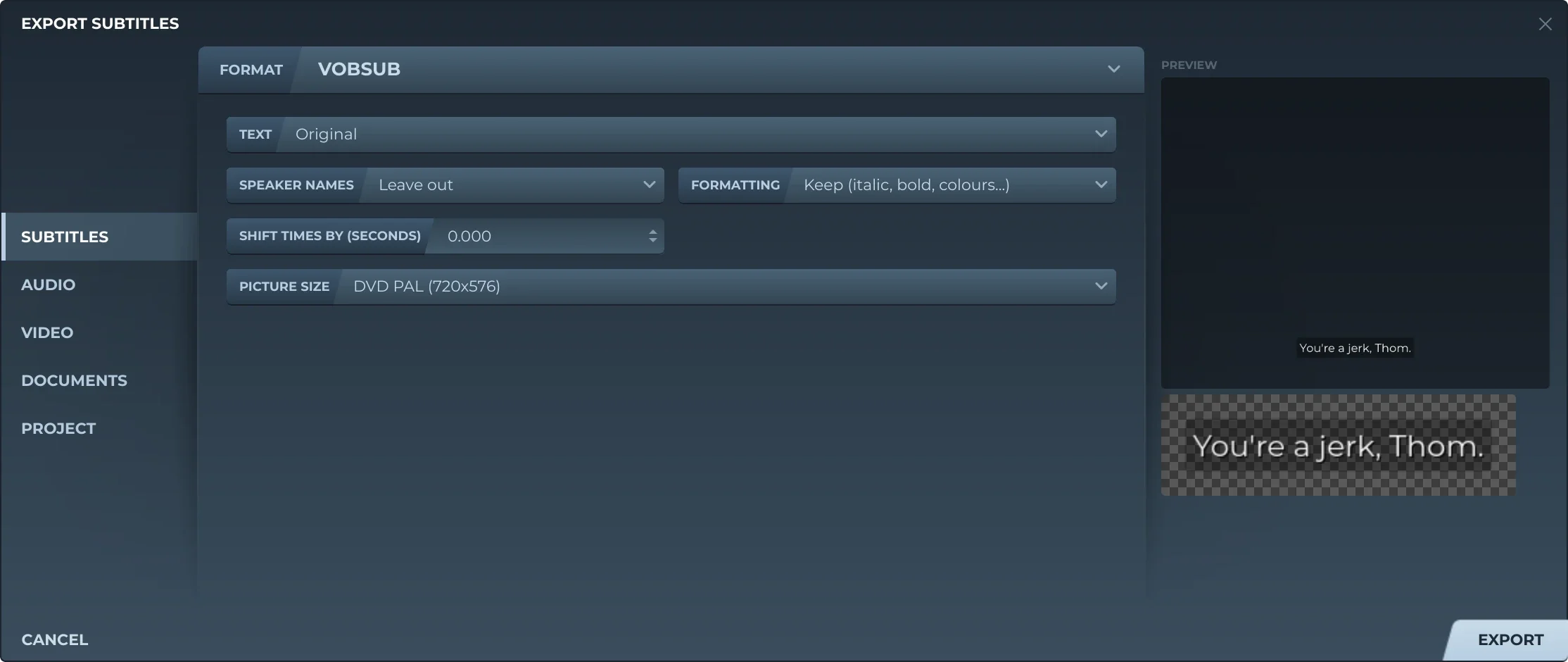
Export, then Subtitles and VOBSUB, offers:
- TextThe original, a translation, or both, the translation below.
- Speaker namesLeft out, or before the text (Thom: …).
- FormattingKept, or removed.
- Shift timesEvery subtitle earlier or later by the same amount.
- Picture sizeDVD PAL (720×576), DVD NTSC (720×480), or the video's own size, for a VobSub kept beside a video file.
Each subtitle is drawn as the preview draws it, then cut to four colours: transparent, and three found for it, mostly the fill, the outline and the edge between. The colours of all the pictures make the palette, or, when there are more than sixteen, the sixteen nearest them all. Opacity is kept in sixteen steps. Where subtitles overlap, the time they share is one picture with both on it. One track, in the language of the text written.
Trivia
Subpicture streams a DVD can carry, each its own language or kind of subtitle. A player shows one at a time.
Bytes in every pack of a .sub, a DVD sector each. A short subtitle fills one, the rest padding.
Colours on the whole disc's palette, of which each subtitle picks four. A DVD keeps the palette in its IFO files; VobSub copies it into the .idx.
Related formats
Open it in Subtitld with the video and retime it on the waveform.