
CEA-608 and CEA-708 closed captions
The closed captions of North American television. CEA-608 comes from analog TV: two bytes a frame, in line 21 of the picture. CEA-708 is its digital successor, with windows, colours and many services. A digital broadcast carries both in every frame. Subtitld reads them from a video, and writes them in SCC and MCC files.
At a glance
| Specification | CTA-608 (formerly EIA-608, then CEA-608) and CTA-708 (formerly CEA-708). In digital video, ATSC A/53 Part 4. |
|---|---|
| Where they travel | In the video's frames, in a caption track of their own (QuickTime's c608), and in SCC and MCC files |
| Time precision | A frame |
| Characters | CEA-608: its own Latin set. CEA-708: ASCII, Latin-1, a few symbols, and 16-bit characters. |
| Styling | CEA-608: italics, underline, seven colours. CEA-708: italics, underline, 64 colours, fonts, sizes, edges and backgrounds. |
| Positioning | CEA-608: a grid of 15 rows of 32 columns. CEA-708: up to eight windows, anchored on a grid of 75 rows. |
| Channels | CEA-608: CC1 to CC4. CEA-708: up to 63 services. |
| Speakers | None in the standards. Captioners write >> at each change of speaker. |
A frame's caption data
Each frame carries a few sets of three bytes. The first byte of each says what the other two are.
FC 94 2F
FD 80 80
FF 42 22
FE 89 01
FA 00 00 …
- 1 · What follows
FCis CEA-608's first field,FDits second.FFstarts a CEA-708 packet, andFEcarries it on. - 2 · CEA-608
Two bytes for each field.
94 2Fshows the caption loaded in CC1;80 80is nothing. - 3 · CEA-708
A packet, two bytes at a time: its header (
42, four bytes long), a service block's (22, service 1, two bytes), then89 01, DisplayWindows for window 0. - 4 · Room
The frame's other sets, carrying nothing. A frame has 20 at 29.97 frames a second, 25 at 24, 24 at 25.
9,600 bits a second for captions. The caption channel of a digital broadcast keeps 960 of them for the CEA-608 it carries along, which converter boxes pass on to analog TVs, and 8,640 for CEA-708.
CEA-608: four channels
The bytes are the ones an SCC file holds: commands and characters, two a frame, on a screen of 15 rows of 32 columns. Each of the picture's two fields carries two caption channels.
| Channel | Where | Use |
|---|---|---|
| CC1 | Field 1, first channel | The programme's captions |
| CC2 | Field 1, second channel | Another language, or nothing |
| CC3 | Field 2, first channel | Often a second language |
| CC4 | Field 2, second channel | Rarely used |
CEA-708: windows and pens
A CEA-708 service draws in windows: up to eight, each with its place, its size, its rows and its style, shown, hidden, toggled and deleted. A pen writes in them, with italics, underline and colours. These load a caption and show it:
| Bytes | Command |
|---|---|
98 18 DA 32 70 13 09 |
DefineWindow 0 Hidden, its bottom centre 90% down and 50% across the screen, one row of 20 columns |
88 01 |
ClearWindows Window 0, empty |
97 C0 00 0E 00 |
SetWindowAttributes No fill behind it, the text centred |
92 00 00 |
SetPenLocation Row 0, column 0 |
90 05 00 |
SetPenAttributes Standard size, upright, not underlined |
91 3C 00 00 |
SetPenColor Yellow, on black |
59 6F 75 … |
You're a jerk, |
90 05 00 91 3F 00 00 |
The pen again White, on black |
20 54 68 … |
Thom. |
89 01 |
DisplayWindows Window 0, in the frame the caption starts |
The window's anchor is one of nine points, its corners, the middle of its sides and its centre: the nine places a subtitle can sit in Subtitld.
| Characters | What they hold |
|---|---|
| G0 | ASCII, but for its delete, which is ♪ |
| G1 | Latin-1: the accents of Western European languages |
| G2 | A few more: … ‘ ’ “ ” • ™ Š Œ ⅛ ⅜ ⅝ ⅞ and box drawing |
| P16 | Characters of 16 bits, as Korean captions use |
Captions in a video
| Where | Who puts them there | How Subtitld reads them |
|---|---|---|
| In the frames: MPEG-2 user data, H.264 and HEVC SEI | Digital broadcasts, and recordings of them (.ts) |
Decoding the video, as long as that takes |
A caption track (c608) |
QuickTime deliveries | At once |
| An SCC file | Broadcast and streaming deliveries | CEA-608 |
| An MCC file | Broadcast deliveries, MacCaption | CEA-708, else CEA-608 |
CEA-608 / 708 in Subtitld
- Every caption's text and line breaks
- Italics and underline
- Colours: seven in CEA-608, 64 in CEA-708
- Where it sits: top, middle or bottom; left, centre or right
- Speakers, as
>>at each change - Start and end, to the frame
- Bold, which neither has
- CEA-708's fonts, sizes, edges and window backgrounds
- More than one service or channel at a time: read one, then another
- Translations beside the original
Save a .usfx project to keep what is Subtitld's.
Reading the captions of a video
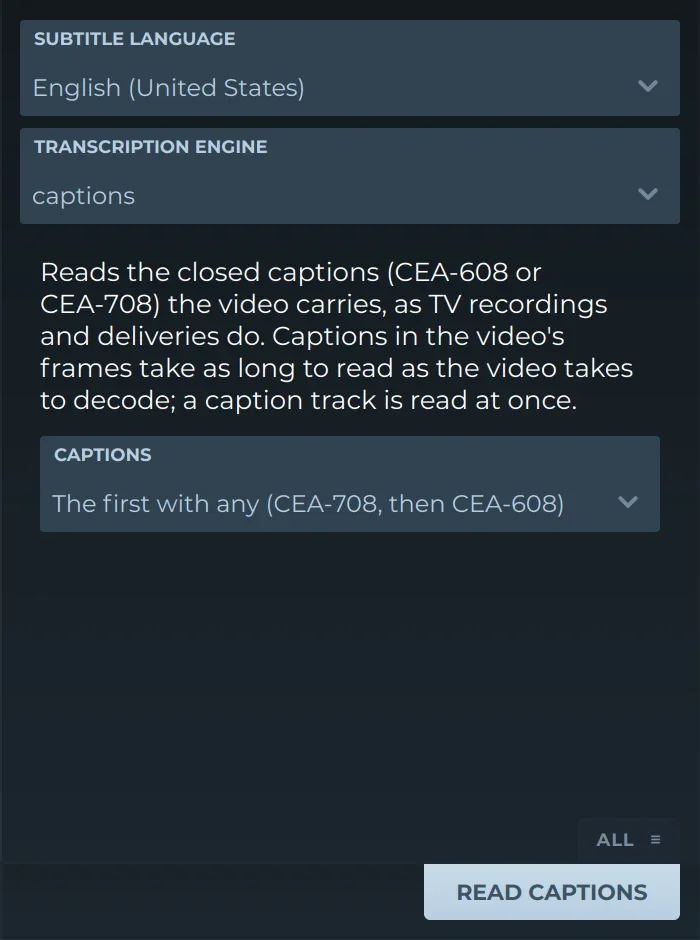
It offers:
- CaptionsThe first the video has, CEA-708 before CEA-608; a CEA-708 service, 1 to 6; or a CEA-608 channel, CC1 to CC4.
- ScopeThe whole video, a range of it, or the selected subtitle, as for a transcription.
Subtitld decodes them as a decoder does. A caption loaded out of sight and shown is a subtitle until it is hidden, cleared or replaced. Captions written live on screen, line by line, become a subtitle a line, until the next line begins. Times are counted from the start of the video. A video with no captions says so.
Recordings of broadcasts come as .ts, .m2ts or .mts files, which Subtitld opens as video.
Writing them
Subtitld writes captions in the files broadcasters and platforms take:
- SCC: pop-on captions in CEA-608, CC1;
- MCC: the same in CEA-608 and, in step with them, in CEA-708's service 1, or CEA-608 alone if you choose.
Trivia
From 1 July 2002, digital TVs sold in the United States, all but the smallest, had to decode CEA-708 captions: the six standard services at least.
Windows a CEA-708 service can have at once, each with its own place, size and style. CEA-608 has one screen.
CEA-708's characters include the closed-caption logo itself, the CC that marks a captioned programme, among its extended ones.
Related formats
-
.sccScenarist Closed Caption
-
.mccMacCaption Ancillary Data Packet Transfer File
-
.ttmlTimed Text Markup Language
Open it in Subtitld, read its captions into the timeline, and fix and retime them on the waveform.