
LRC lyrics
The lyrics file music players scroll in time with a song: each line after the moment it is sung. Enhanced LRC adds the moment of each word, for karaoke. Subtitld opens both, keeps the word timing, and writes it back.
At a glance
| Extension | .lrc |
|---|---|
| Media type | None registered |
| Specification | None. Lyrics Displayer introduced it in 1998; the A2 Media Player added word times, as enhanced LRC. |
| Time precision | Hundredths of a second; some files write thousandths |
| Text encoding | Not declared. Subtitld detects it, and writes the encoding you choose. |
| Styling | None |
| Positioning | None |
| Speakers | None. The Walaoke extension marks lines M:, F: or D: for duets. |
| In containers | None. A file beside the song, with the same name. |
Anatomy of a file
Tags about the song, then a line of lyrics after each moment. What Subtitld writes for two subtitles, the first with word timing:
[ti:Tears of Steel]
[ar:The Blender Foundation]
[al:Open Movies]
[by:Celia]
[00:12.40]<00:12.40>Hold <00:12.80>on <00:13.10>to <00:13.30>the <00:13.90>light<00:14.90>
[00:14.90]
[00:15.20]We remember every word
[00:17.80]
- 1 · ID tags
What the song is: its title, artist and album, and who made the file.
- 2 · Moment
When the line is sung. A moment with nothing after it clears the line.
- 3 · Words
The line, all on one. In enhanced LRC, each word after its own moment, the last moment where the last word ends.
The timecode
No hours: minutes go past 59, and past 99 in a long recording. Some files write thousandths, a colon before the fraction, or no fraction at all.
ID tags
| Tag | What it holds | In Subtitld |
|---|---|---|
[ti:] |
The song's title | Kept |
[ar:] |
The artist | Kept |
[al:] |
The album | Kept |
[au:] |
Who wrote the song | Kept |
[by:] |
Who made the LRC file | Kept |
[length:] |
How long the song is | Kept |
[offset:] |
Milliseconds to take from every moment; a positive one shows the lines sooner | Applied as the file opens |
[re:], [ve:] |
The program that wrote the file, and its version | Not kept |
[#:] |
A comment | Not kept |
Lines, and words
A line is shown until the next moment. A line sung more than once carries all its moments: [00:21.10][01:12.40]Chorus.
Enhanced LRC puts a moment before each word, in angle brackets, inside the line. A word lasts until the next stamp.
| LRC | Enhanced LRC | |
|---|---|---|
| A moment | Each line's, [01:12.40] |
Each line's, and each word's, <01:12.40> |
| Where a line ends | At the next moment | At the next moment |
| Where a word ends | — | At the next word stamp |
| Read by | Most music players | Players with karaoke, and YouTube |
Word timing in Subtitld
Subtitld keeps the moment of each word in the subtitle's text, as ASS writes karaoke: a code before each word, its length in hundredths of a second.
{\k40}Hold {\k30}on {\k20}to {\k60}the {\k100}lightThe codes show in the subtitle's text; the preview shows the words alone. Exported as ASS, the timing is ASS karaoke; exported as LRC, it is word stamps again.
A .usfx project does not keep word timing yet. Saved as a project, a subtitle keeps its first code and loses the rest. Export LRC or ASS to keep it.
LRC in Subtitld
- Every subtitle's text, its lines joined on one
- The moment of each word, as word stamps
- Start, and an end where a pause follows, to the hundredth
- The title, artist, album, songwriter, maker and length
- Line breaks inside a subtitle
- Italic, bold, underline and colour
- Where a subtitle sits on the screen
- Speakers' names as such, translations beside the original
- Dubs, speakers' faces and colours
Save a .usfx project to keep them.
Opening an LRC file
Subtitld reads:
- a subtitle a line and moment, a line with several moments once for each;
- each line as lasting until the next moment; the last one until its last word stamp, else three seconds;
- hundredths, thousandths, a colon before the fraction, or none;
[offset:], on lines and words alike;- word stamps as word timing, with or without spaces around them, as the A2 player writes them;
- the lines in order of time, whatever order the file has them in;
- any encoding.
Walaoke's M:, F: and D: stay in the text. A .lrc with no line that starts with a moment says so.
Exporting LRC
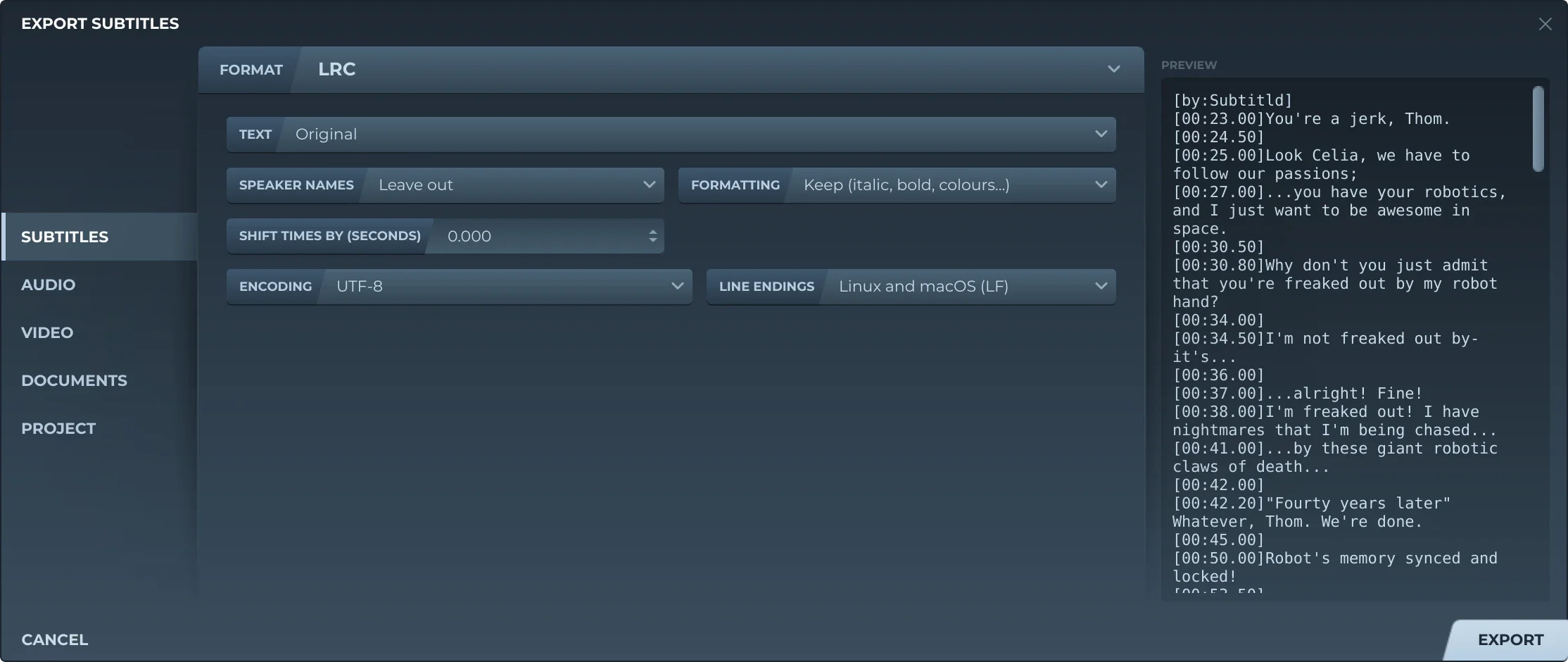
Export, then Subtitles and LRC, offers:
- TextThe original, a translation, or both, the translation after it on the same line.
- Speaker namesLeft out, or before the text (Thom: …).
- FormattingKept, or removed. Removed, the word timing goes with it, and each line is written plain.
- Shift timesEvery subtitle earlier or later by the same amount.
- EncodingUTF-8, with or without a byte order mark, UTF-16, or a Windows code page: Western European, Central European, Cyrillic or Korean.
- Line endingsLinux and macOS, or Windows.
Subtitld writes the ID tags the project has, then a line for each subtitle at its start, in hundredths, with no offset. Where a subtitle ends before the next begins, or is the last, a moment with nothing after it says so. Empty subtitles are left out.
Trivia
Kuo (Djohan) Shiang-shiang's Lyrics Displayer, from Taiwan, brought the format out, with a plug-in for Winamp.
YouTube lists LRC among the caption files it takes: no markup recognised, but enhanced LRC supported.
Walasoft's Walaoke marks each line of a duet as the man's, the woman's or both, to show them in different colours.
Related formats
Open it in Subtitld with the video and retime it on the waveform.