
WebVTT in HTTP Live Streaming
How Apple's HTTP Live Streaming carries subtitles: a playlist, and the WebVTT files it lists, each a few seconds of the programme. A player fetches them as it plays, beside the video's own segments.
At a glance
| Extension | .m3u8 |
|---|---|
| Media type | The playlist: application/vnd.apple.mpegurl. Its segments: text/vtt. |
| Specification | RFC 8216 (2017), and Apple's HLS Authoring Specification for Apple Devices. The segments are WebVTT. |
| Time precision | Milliseconds, in the segments' cues |
| Text encoding | UTF-8, for the playlist and the segments alike |
| Styling | WebVTT's: italic, bold, underline, and colours by class |
| Positioning | WebVTT's cue settings |
| Speakers | WebVTT's voice tags: <v Thom> |
| In containers | None for WebVTT: plain text files on a web server. IMSC subtitles in HLS come in fragmented MP4. |
Anatomy of a playlist
A list of segments, each with its length. The subtitles are in the files it names.
#EXTM3U
#EXT-X-VERSION:3
#EXT-X-TARGETDURATION:6
#EXT-X-MEDIA-SEQUENCE:0
#EXT-X-PLAYLIST-TYPE:VOD
#EXTINF:6.000,
movie_segments/segment00000.vtt
#EXTINF:6.000,
movie_segments/segment00001.vtt
#EXTINF:2.000,
movie_segments/segment00002.vtt
#EXT-X-ENDLIST
- 1 · Header
#EXTM3Ufirst, always. Then the version, the first segment's number, andVOD: a programme whose segments are all there. - 2 · Target duration
Whole seconds that no segment's length, rounded, goes over.
- 3 · Length
How long the segment after it lasts, in seconds.
- 4 · Address
Where the segment is: beside the playlist here, or a web address.
- 5 · End
Nothing more will come. A live stream leaves it out and keeps adding segments.
Anatomy of a segment
Each segment is a WebVTT file of its own, with one line more in its header.
WEBVTT
X-TIMESTAMP-MAP=LOCAL:00:00:00.000,MPEGTS:900000

00:00:04.000 --> 00:00:07.500
<v Celia>You're a jerk,
Thom.

00:00:08.000 --> 00:00:09.600
<v Thom><i>Celia!</i>
- 1 · Header
WEBVTT, as in any WebVTT file. - 2 · Timestamp map
Which moment of the video a cue time stands for.
- 3 · Cues
Every cue shown during the segment, each with its whole time, even the part outside the segment.
This is the second segment, from 6 to 12 seconds. Its first cue began in the first segment, at 4 seconds, and is in both: a player that starts here still shows it.
The timestamp map
The video's frames carry MPEG-2 timestamps, counted on a clock of 90,000 ticks a second. The map ties the two clocks together:
| Part | What it says |
|---|---|
LOCAL:00:00:00.000 |
A cue time in this file |
MPEGTS:900000 |
The video's timestamp at that time: 900,000 ticks, 10 seconds |
Many encoders start a stream's clock at 10 seconds, so 900000 is the usual value. With the map, a cue at 00:00:04.000 is shown with the frame stamped 1,260,000. A segment without one is read as mapping 0 to 0.
A wrong map moves every subtitle. If the video's clock starts at 10 seconds and the map says 0, a player shows the subtitles 10 seconds late, or not at all. Write the value the video's encoder used.
Subtitles in a whole stream
A stream's main playlist lists its renditions: the video at several sizes, the audio, and the subtitles in each language, each with a playlist of its own.
#EXT-X-MEDIA:TYPE=SUBTITLES,GROUP-ID="subs",NAME="English",LANGUAGE="en",DEFAULT=YES,URI="en.m3u8"| Attribute | What it holds |
|---|---|
TYPE |
SUBTITLES |
LANGUAGE |
The subtitles' language, as a BCP 47 tag |
DEFAULT |
YES for the one shown when the viewer has chosen none |
URI |
The subtitles' own playlist, like the one above |
HLS or a WebVTT file?
| WebVTT file | HLS | |
|---|---|---|
| Files | One | A playlist and a segment every few seconds |
| Shown by | A web page's <track>, players |
HLS players: Safari, iPhone, Apple TV, and hls.js on the web |
| Tied to the video by | Times from the start | The timestamp map, against the video's own timestamps |
| Live | — | Segments added as the programme goes on |
HLS in Subtitld
- Every subtitle's text and line breaks
- Italic, bold, underline and colour, as WebVTT keeps them
- Where it sits, as cue settings
- Speakers, as voice tags
- Start and end, to the millisecond
- The language: Subtitld writes the subtitles' playlist, not a main playlist that names it
- Translations beside the original
- Dubs, speakers' faces and colours
Save a .usfx project to keep them.
Opening an HLS playlist
Open the .m3u8 file. Subtitld:
- follows a main playlist to its subtitles: the rendition in the project's language, else the default one, else the first;
- reads each segment the playlist lists, beside it or at an
httporhttpsaddress, and the part of a file a byte range names; - reads the segments as WebVTT, and moves each by its timestamp map, so that the first moment of the stream is 0;
- keeps a cue that is repeated in the segments it spans once, and joins a cue a segmenter cut in two at a segment's edge;
- reads IMSC segments in fragmented MP4, as CMAF carries them;
- takes the rendition's language as the project's.
A file that does not begin with #EXTM3U, or a playlist with no subtitles in it, says so.
Exporting HLS
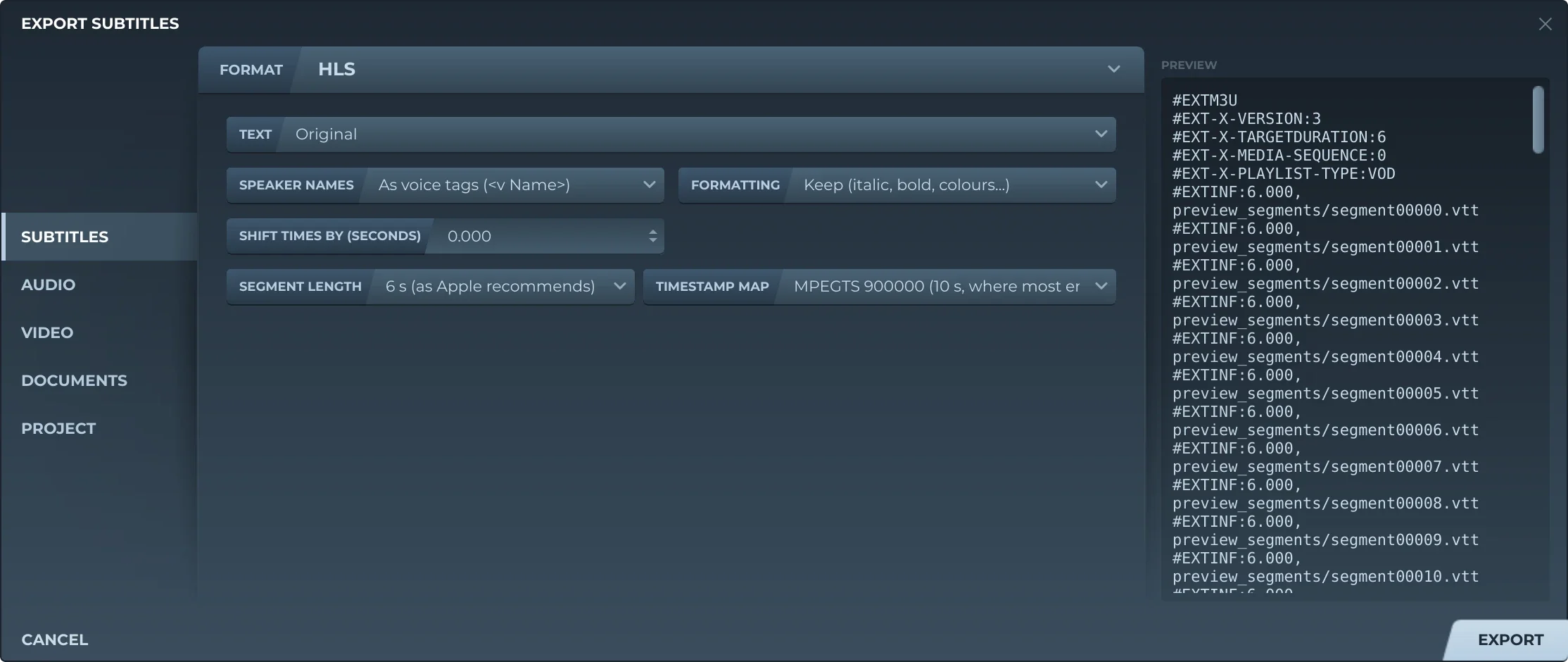
Export, then Subtitles and HLS, offers:
- TextThe original, a translation, or both, the translation below.
- Speaker namesLeft out, before the text (Thom: …), or as voice tags (
<v Thom>). - FormattingKept, or removed.
- Shift timesEvery subtitle earlier or later by the same amount.
- Segment length2, 4, 6 or 10 seconds. 6 is what Apple recommends.
- Timestamp map
MPEGTS:900000, 10 seconds, where most encoders start a stream's clock, orMPEGTS:0.
Subtitld writes the playlist, version 3, and a folder beside it named after it (movie.m3u8, movie_segments) with the segments, segment00000.vtt and on. Every segment lasts the same but the last, and has the same map, so its cue times are the programme's. The segments run for as long as the video does, empty ones included, or for as long as the subtitles do when there is no video. Saving again replaces the segments in the folder.
Add the playlist to your stream's main playlist with an #EXT-X-MEDIA:TYPE=SUBTITLES line, its language and its address.
Trivia
Apple released HTTP Live Streaming in May 2009. It was published as RFC 8216 in August 2017, after years as an Internet-Draft.
How long the 90,000-tick clock of MPEG-2 timestamps runs before its 33 bits wrap round to zero. RFC 8216 asks players to cope when it does and cue times go on.
Apple's authoring specification says target durations should be 6 seconds, and that WebVTT subtitles must have a timestamp map.
Related formats
Open it in Subtitld with the video and retime it on the waveform.