
Avid SubCap caption file
The text file Avid Media Composer's SubCap effect imports and exports: each subtitle's timecodes in and out, its lines, and a blank line. Nothing else: the font, the colours and the place on the screen are set in the effect, for every subtitle at once. Other tools call it Avid DS, after the finishing system it came from.
At a glance
| Extension | .txt |
|---|---|
| Media type | None registered |
| Specification | None. The files Media Composer's SubCap effect writes, and reads back. |
| Time precision | A frame, at the sequence's rate. The file does not say which. |
| Text encoding | Not declared. Subtitld writes UTF-8 unless you choose another, and reads other encodings too. |
| Styling | None: SubCap styles every subtitle the same, in the effect |
| Positioning | None: set in the effect |
| Speakers | None |
| In containers | None. A file imported into the SubCap effect on a sequence's video track. |
Anatomy of a file
A comment, the subtitles between two markers, and nothing else.
@ This file written with the Avid Caption plugin, version 1

<begin subtitles>
01:00:23:00 01:00:24:12
You're a jerk, Thom.

01:00:25:03 01:00:28:00
Celia, wait.
I can explain.

<end subtitles>
- 1 · Header
A line that begins
@is a comment. Media Composer writes this one at the top. - 2 · Markers
The subtitles are between
<begin subtitles>and<end subtitles>. - 3 · Timing
In, a space, out: timecode with the frames after the seconds.
- 4 · Text
Lines of plain text. A blank line ends the subtitle.
The timecode
The file names no frame rate: its frames are the sequence's, and only the sequence knows how many a second has. A ; before the frames is drop-frame, which only 29.97 and 59.94 count in: it skips frame numbers at the start of each minute, except every tenth, so the clock keeps time.
Sequences start at an hour. Media Composer gives a new sequence the timecode 01:00:00:00, so a file exported from one carries that hour in every time. A video file starts at 0:00.
SubCap or SubRip?
| Avid SubCap .txt | SubRip .srt | |
|---|---|---|
| Number before each subtitle | — | 1, 2, 3… |
| Times | Frames: 01:00:23:00 |
Milliseconds: 00:00:23,000 |
| Between the times | A space | --> |
| Formatting | None | Tags most players read |
| Header | A comment and two markers | None |
| Made for | Media Composer's SubCap effect | Almost every player |
Avid SubCap in Subtitld
- Every subtitle's text and line breaks
- Start and end, to the frame, in order
- The frame rate, drop-frame and the hour the file counts from, for saving it again
- Italic, bold, underline and colour
- Where a subtitle sits on the screen
- Speakers, translations beside the original
- Dubs, speakers' faces and colours
Save a .usfx project to keep them.
Opening an Avid SubCap file
A .txt is many formats. Subtitld takes one for SubCap when it has the <begin subtitles> line or the plugin's header, and reads:
- the times at the video's frame rate, else 25; drop-frame times (
;, or.and,as some tools write it) at 29.97, or 59.94 for a video near 60; - comments anywhere, the markers in any case, and text on the line of the times, after them;
- formatting tags written into the text, as Subtitld's own;
- any encoding;
- the subtitles in order, whatever order the file has them in.
When every subtitle starts an hour or more in, Subtitld takes the file to count from 01:00:00:00, and takes that hour off, so the subtitles meet the video. This is a guess from the times: a file whose subtitles really start after the first hour comes in an hour early, and one counted from 10:00:00:00 comes in nine hours late. Shift the times to put them right. The hour is given back when the file is saved again.
Exporting Avid SubCap
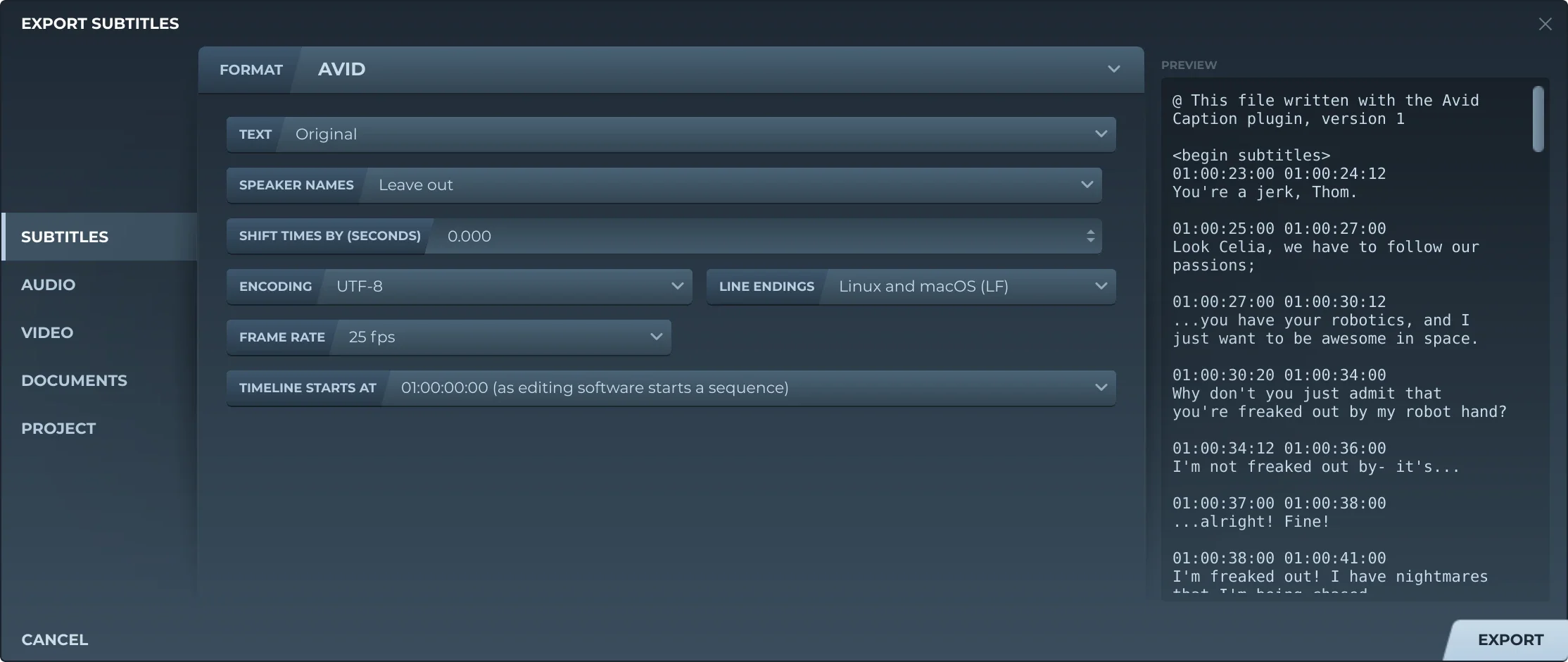
Export, then Subtitles and AVID, offers:
- TextThe original, a translation, or both, the translation below.
- Speaker namesLeft out, or before the text (Thom: …).
- Shift timesEvery subtitle earlier or later by the same amount.
- EncodingUTF-8, with or without a byte order mark, UTF-16, or a Windows code page: Western European, Central European, Cyrillic or Korean.
- Line endingsLinux and macOS, or Windows.
- Frame rateThe video's, or another: the sequence's.
- TimecodeDrop-frame or not, at 29.97 and 59.94, the rates that have it.
- Timeline starts at00:00:00:00, or 01:00:00:00, as editing software starts a sequence.
There is no formatting choice: SubCap shows tags as text, so each subtitle is written plain, with no blank line inside it. A subtitle lasts at least one frame.
In Media Composer, put the SubCap effect on an empty video track above the sequence, open the Effect Editor, and import the file under Caption Files. Choose the same start in Subtitld as the sequence has.
Trivia
Avid stopped selling Avid DS, its finishing system that began as Softimage|DS. Caption tools still name the SubCap text file after it.
SubCap imports one other kind of file: EBU STL, which Avid lists by its other name, N19.
The hour a new sequence starts at in Media Composer, and so the hour most SubCap files count from.
Related formats
Open it in Subtitld with the video and retime it on the waveform.